Cloud-to-Cloud Migration: A Guide for Moving Between Cloud Providers
- Created: Feb 10, 2026
- 13 min

Senior Devops
Cloud-to-cloud migration means moving your applications, data, and workloads from one cloud provider to another. Say, from AWS to Azure, or Google Cloud to AWS. It’s a decision that more businesses face as their needs evolve.
Companies consider this move for different reasons. Maybe you’ve outgrown your current cloud’s capabilities. Perhaps you’ve found a better pricing structure elsewhere, or you need specific features that your current platform doesn’t offer well. Sometimes the reason is compliance: you need to meet data residency requirements or industry regulations.
Cloud migration can be complex and contain many moving parts. It affects your daily business operations, your budget, and how your team works. That’s why it’s important to choose a cloud migration services company that has experience in your specific cloud migration case.
This guide walks you through what cloud-to-cloud migration actually involves. You’ll learn about different approaches, the step-by-step process, common challenges, and how to know if you’re ready to handle this internally or if you need outside help.
Contact us to get started!
What is Cloud-to-Cloud Migration?
Cloud-to-cloud migration is one of the types of cloud migration activities. This is the process of moving applications, data, and infrastructure components from one cloud provider to another. This can mean migrating from AWS to Microsoft Azure, from Google Cloud to AWS, or restructuring setups to support a multi-cloud strategy.
Cloud migration has become a sort of modernization imperative for businesses looking to streamline their IT operations. And it’s no wonder, as cloud adoption rises and tech analysts predict that 75% of organizations will adopt cloud-based data infrastructure in 2026.
What Makes Cloud-to-Cloud Migration More Complex?
It’s important to separate this from on-premise to cloud migration. In cloud-to-cloud scenarios, your systems are already running in the cloud. The challenge is not whether the cloud works for your business, but which cloud fits best at this stage of growth.
In practice, this often involves more than copying data. Applications may depend on cloud-specific services, storage formats, security models, or APIs. Even small differences between providers can affect performance, cost, and reliability if they’re not handled carefully.
Common scenarios include:
- Moving from AWS to Azure to better integrate with Microsoft-based tools.
- Shifting from Google Cloud to AWS for a broader service ecosystem.
- Redesigning infrastructure to reduce reliance on a single provider.
- Many organizations can also choose a hybrid cloud environment, which combines public and private cloud services.
Common Reasons Companies Migrate
Most businesses, including yours, don’t wake up wanting to change cloud providers.
Migration to a different cloud computing provider usually becomes an option after clear pressure builds up: financial, technical, or regulatory. The main reasons for moving from one cloud solution to another include:
| Reason | What it means | Example |
|---|---|---|
| Cost optimization | Finding better pricing models | A company with predictable workloads finds Azure reserved instances cheaper than AWS |
| Better feature fit | Access to specific tools or services | A healthcare platform needs Azure services aligned with HIPAA requirements |
| Performance improvements | Faster response times or better uptime | An e-learning platform needs lower latency in certain regions |
| Vendor lock-in concerns | Reducing dependence on one provider | An enterprise adopts a multi-cloud strategy to avoid risk |
| Compliance requirements | Meeting data residency or data security rules | A European company must store data strictly within EU regions |
| Merger or acquisition | Aligning technology stacks | Two companies consolidate infrastructure after an acquisition |
These reasons often overlap. For example, a compliance requirement may also lead to higher costs on the current platform, or performance issues may surface as the user base grows internationally.
Understanding why you’re migrating is the foundation for every decision that follows, from choosing the right cloud migration strategy to setting realistic timelines.
Once the motivation is clear, the next step is deciding how to migrate. That’s where different migration approaches come into play.
Types of Cloud-to-Cloud Migration
Not all migrations follow the same path. The approach you choose depends on your timeline, budget, technical needs, and how much you want to optimize during the move.
Here are the main types of cross-cloud migration:
| Approach | What it involves | Best for | Complexity | Timeframe |
|---|---|---|---|---|
| Lift and Shift (Rehosting) | Move everything as-is to new provider | Quick migrations, minimal changes | Low | Weeks to months |
| Replatforming | Minor optimizations during move | Balance between speed and improvement | Medium | 2-4 months |
| Refactoring (Rearchitecting) | Rebuild apps to leverage new cloud features | Long-term optimization, cloud-native benefits | High | 6-12+ months |
When Each Type of Cloud Migration Makes Sense
Lift and shift type works best when you need to move fast but have budget constraints. It can also be an option if your current setup already works well. It’s also the right choice if you plan to optimize later: move first, then improve incrementally.
Replatforming makes sense when you have time for modest improvements and want some immediate benefits from the new platform. This works well when certain parts of your infrastructure would clearly benefit from the new provider’s managed services.
Refactoring, in its turn, is best for situations when you’re committed to long-term optimization or have applications that struggle with the current architecture.
In some cases, companies choose refactoring when the new provider’s native features would significantly improve their product. This is also the right approach if you’re already planning to modernize and can combine that work with migration.
Cloud-to-Cloud Migration Example: Step by Step
In one of our projects, we needed to modernize a cloud-native platform.
Specifically, it was a large security platform that helped companies manage physical access, track security events in real time, and respond to incidents automatically. As more organizations started using the platform, the existing setup became harder to scale and maintain.
We stepped in to implement new features and conduct large-scale technical modernization. Basically, it was a massive cloud transformation case.
And part of the work involved a cloud-to-cloud migration. Here’s how we did it, step by step:
Step 1: Assessment of the existing system
The platform already ran in the cloud, but it consisted of many interconnected services written in different languages and deployed on Google Cloud.
Before touching infrastructure, we mapped how events flowed through the system and how services depended on each other. This step helped us define safe migration boundaries.
Step 2: Limited-scope changes
Instead of migrating everything at once, we began with selected backend services. We gradually migrated core services from Python to Golang and tested them in isolation.
This allowed us to validate performance gains and operational behavior without affecting the full platform.
Step 3: Infrastructure and data changes testing
We didn’t switch databases and messaging systems all at once.
Instead of turning off Spanner and Pub/Sub in one moment, we ran the new systems alongside the old ones. The platform kept working as usual, but part of the data and events also flowed through PostgreSQL and Kafka.
This let us see real differences early. For example, some data operations behaved slightly differently in PostgreSQL than in Spanner, and some events moved through the system in a different order with Kafka. Because we spotted this while the old systems were still active, fixing these issues was safe and low-risk.
By the time we fully switched over, we already knew the new setup worked the way we needed.
Step 4: Platform environment migration
Once services, data handling, and workflows were stable, we migrated the broader infrastructure from GCP to AWS.
By this point, the team already understood the target cloud environment, tooling, and performance characteristics, which reduced uncertainty during the move.
Step 5: Optimization and standardization
After migration, we went through the system and made it faster and easier to run. We reduced unnecessary load, reused results instead of recalculating them every time, and simplified how long-running processes were handled.
The migration delivered about 30% better performance, reduced day-to-day maintenance by 25–40%, and created a clearer, more scalable architecture. Most importantly, the platform stayed live and reliable throughout the process.
Projects like this show that cloud-to-cloud migration is often just one piece of a bigger modernization effort. This step is more than moving infrastructure. It helps make the whole system faster and ready for the next stage of growth.
Common Challenges of Cross-Cloud Data Migration
The cloud-to-cloud migration process usually comes with a few predictable challenges. None of them is unusual, and we see them in almost every project.
What matters is understanding them early and knowing how to handle them in practice. Here are common cloud migration challenges to be aware of:
Long data transfer time
Data takes time to move, especially when there are years of files. To avoid long delays, we split data into parts and transfer it in parallel, often using faster, dedicated connections instead of standard internet transfers.
Application compatibility
Applications are often built using services that are specific to one cloud provider. When moving to another cloud, some features may not work the same way. For instance, an app using AWS-specific storage may need small changes to run properly on Azure. Early testing helps catch these issues before users notice them, and small updates keep the app stable without a full rebuild.
Downtime risks
Many businesses can’t afford for their system to be unavailable. To minimize downtime, we migrate systems step by step. The old and new environments run at the same time until the switch is safe.
Cost overruns
During migration, companies often pay for two cloud setups at once. If this period lasts too long, costs rise quickly. Even the most well-thought-out cloud migration strategy can’t predict everything, so one needs to be ready for some cost re-checks.
Skill gaps
Even strong internal teams may be new to the target cloud platform. For example, a team experienced with AWS may need time to get comfortable with Azure tools. Short training sessions and support from experienced engineers help teams adapt faster and avoid mistakes.
Security differences
Each cloud provider handles security and access in its own way. If these differences are ignored, sensitive data may be exposed or compliance rules broken. This is especially critical in healthcare or fintech projects. Early security reviews and compliance checks ensure data stays protected from day one.
Most of these challenges are not unique or unexpected. When they are planned early, cloud-to-cloud migration becomes a manageable, structured process instead of a risky experiment.
The State of Cloud report by Flexera also identified the following challenges that businesses face when migrating to the cloud: 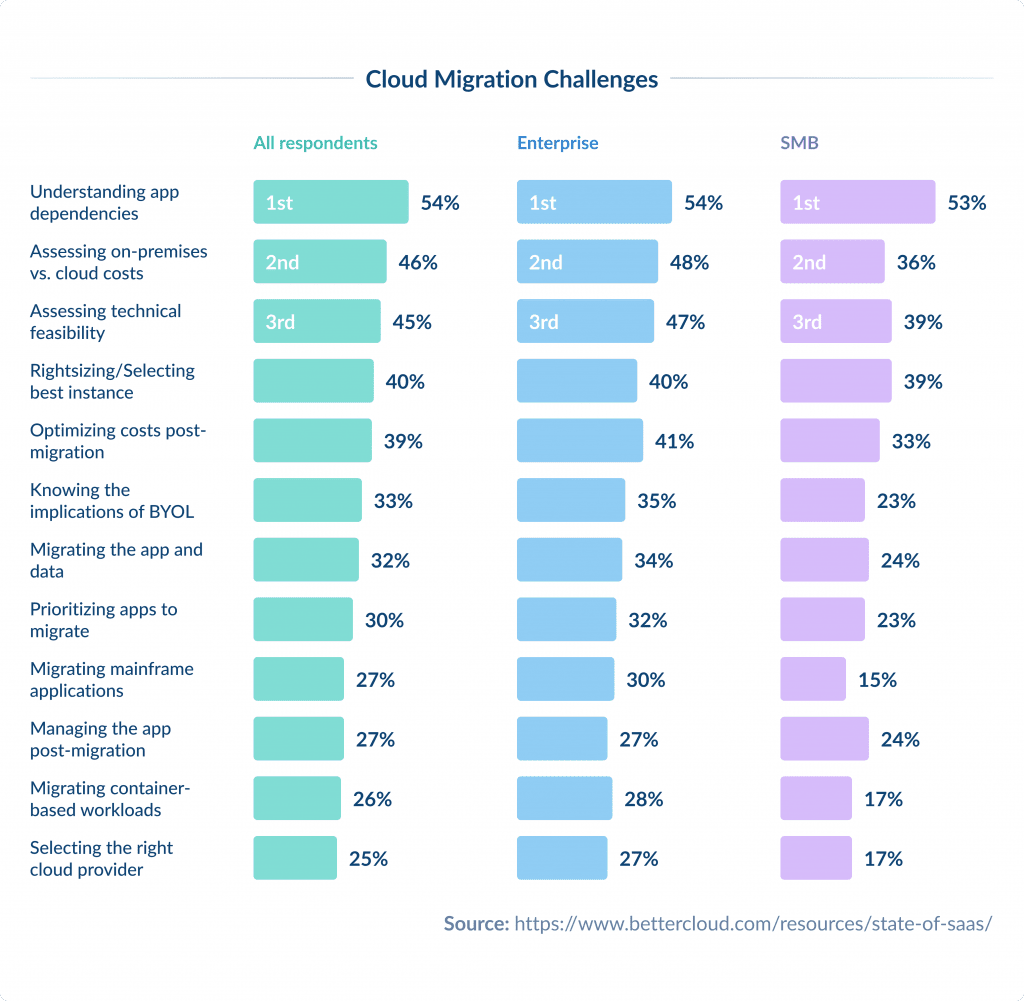
Best Practices for Successful Cloud Migration
I’ve learned from all the cloud migration projects I’ve worked on that the success of cross-cloud migration depends on just two things:
- A clear reason for the move. If you know exactly why you’re changing cloud providers ( for cost savings, compliance, performance, or scale), you make better decisions from day one.
- Careful execution. An effective cloud migration strategy, early testing, and moving step by step, prevent downtime and cost spikes.
When these two are in place, cloud-to-cloud migration becomes predictable and manageable.
These are some best practices that come from real projects. I’ve divided them into some practical steps to make before, during, and after the move.
Before Migration
Get stakeholder buy-in across departments
Migration isn’t just an engineering project. Your finance team needs to approve the budget and understand why costs might spike temporarily. Customer support should know if there might be service interruptions. Sales needs to communicate changes to clients, especially if data locations are shifting.
Bring everyone into the conversation early. When a marketing manager understands that migration will improve site speed for European customers, they become an advocate instead of asking why engineering is disrupting things. And when the finance team knows you’ll be running both clouds for six weeks, the duplicate costs don’t come as a surprise.
Document everything about your current setup
Most companies don’t have complete maps of their infrastructure. There’s the production database everyone knows about, but also that test database someone created two years ago that’s somehow still running. There are API integrations that still work, but nobody remembers setting them up.
Before you migrate, write down what you have. List every application, database, and service. Note how they connect to each other. A healthcare company we know discovered during this process that they had 14 databases when they thought they had 8. They retired 4 that nobody was using anymore, and that saved them migration time and ongoing costs.
Run a pilot migration with a non-critical workload
Your first migration shouldn’t be your payment processing system. Pick something low-stakes, such as an internal admin tool or a development environment. It can even be a feature that only a few customers use.
This way, if anything goes wrong, you’ll just know that your critical infrastructure wasn’t affected, and it’s basically a minor challenge. At the same time, you learn how the new cloud environment behaves in real conditions. You see how long transfers take and which settings need adjustment. This knowledge will help you move faster with much fewer security risks.
During Migration
Monitor constantly
Set up monitoring before you migrate anything to the new cloud infrastructure. Track:
- response times,
- error rates,
- CPU usage,
- database connections.
Basically, all the metrics tell you if things are working normally. I’ll break down the key metrics further in the article.
Why is migration monitoring important? You may notice, for example, that application response times are slowing down by 200 milliseconds. Of course, its not enough to alarm users immediately, but a sign that something wasn’t right.
During the investigation, you may discover that a database connection pool is configured too small for the new environment. And you can fix it to prevent what could have become a serious performance problem.
Maintain detailed logs
Write down what happens as you move through your cloud migration journey:
- When did you start migrating the user database?
- What time did you switch traffic to the new servers?
- What error messages appeared and how did you resolve them?
These notes help you troubleshoot when something breaks.
Have rollback plans ready
For every step, know how to undo it. If switching your database to the new provider fails, how do you get back to the working version on the old provider? How long does that take?
Test your rollback before you need it under pressure and run through the steps during a low-stakes moment. 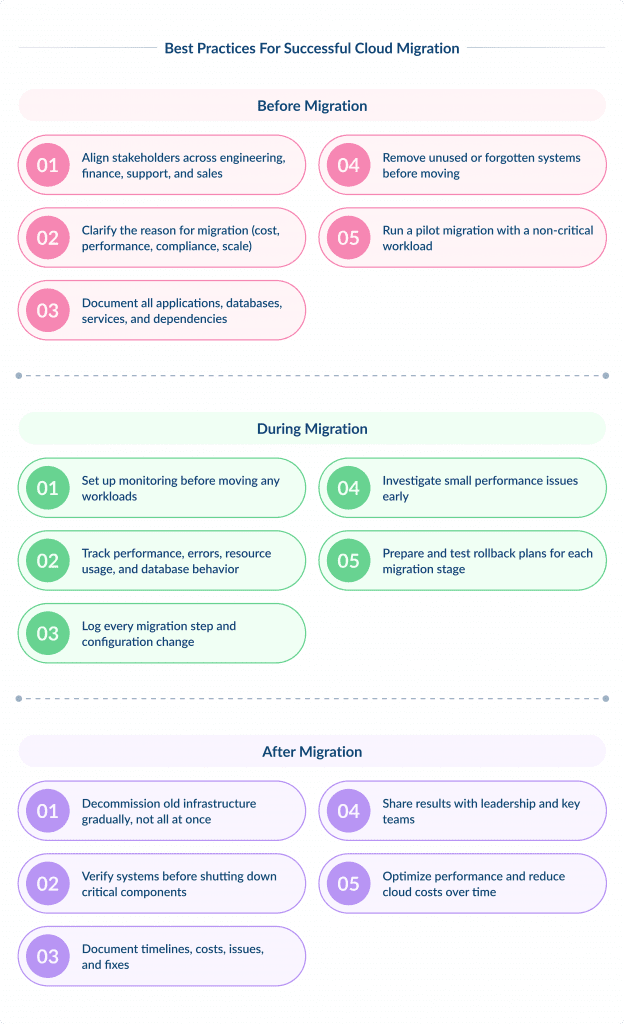
After Migration
Decommission old infrastructure methodically
Shut down your old cloud environment carefully, one piece at a time. Start with the least important systems and verify nothing breaks before moving to more critical ones.
This is extremely important. Otherwise, it may take much longer to migrate. On one project, for example, a company deleted its old database replicas but kept the primary for two extra weeks.
During that time, they discovered a reporting system that was still connecting to the old database (something they’d missed in their dependency mapping). And because the database still existed, the fix was pretty simple.
Document lessons learned
Write down what actually happened versus what you planned. Include costs, timelines, problems you encountered, and solutions that worked.
This document is valuable and can be a base for a more detailed migration plan if you ever migrate again. And it’s also useful for leadership, as they need numbers and clear cloud migration benefits.
Continue optimization
Migration gets your applications running on the new cloud service provider, but they probably aren’t optimized yet. Plan to spend the next few months tuning performance and reducing costs.
Speaking about costs, let’s unwrap what to expect when it comes to the budget part of your cloud migration strategy.
Let's shape your startup's product vision together!
Cross Cloud Migration Costs
Many companies start the process expecting immediate savings. I remember one client told us they were moving clouds mainly to cut the bill in half.
But what they hadn’t accounted for was the transition period. For several months, they paid for two cloud environments at the same time and involved both internal teams and external engineers. This is a common thing that is also known as the migration double bubble.
For several weeks or months, the client paid for compute, storage, security tools, and licenses across both environments because the workloads were tested, cut over, and then stabilized. 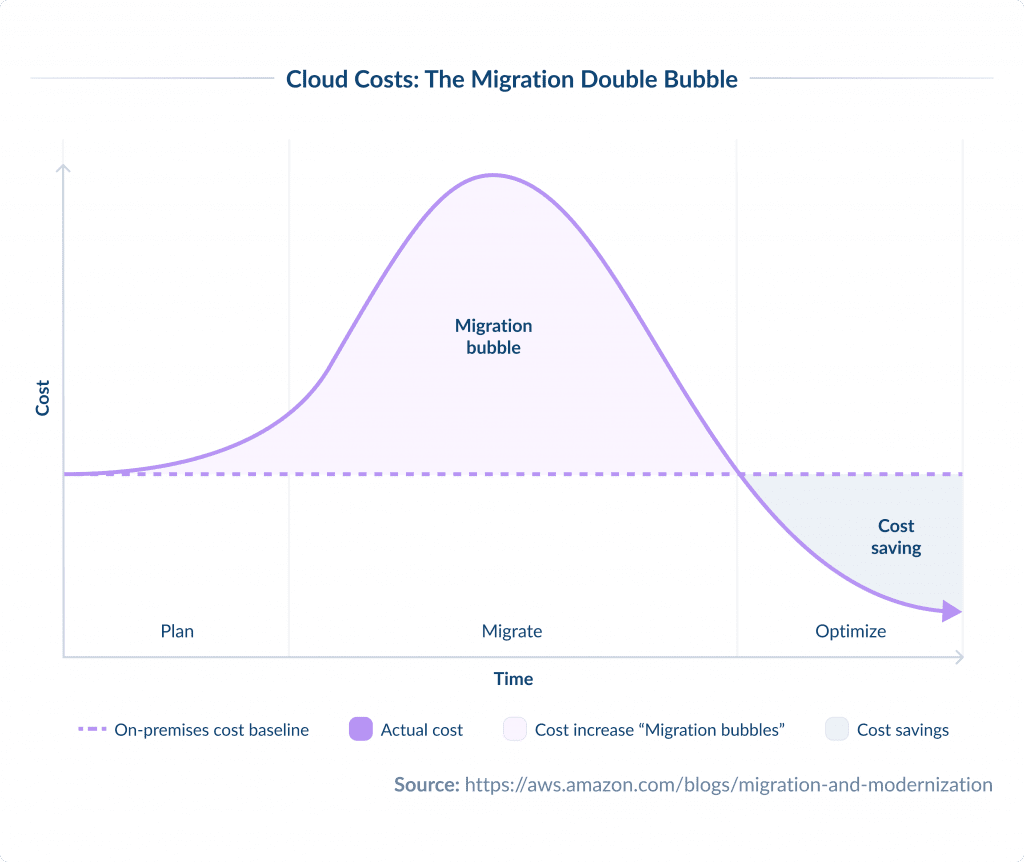
As a result, their monthly costs went up before they went down.
That’s why it’s important to keep in mind that cloud investment always entails short-term costs before long-term benefits appear. The key is knowing where costs come from and planning for them upfront.
Here are some cost factors that influence the final check of the cloud migration and how you can avoid surprises along the way with a comprehensive migration plan:
| Cost category | What’s included | Planning tip |
|---|---|---|
| Migration services | Tools, transfer fees, professional services | Get quotes from multiple sources |
| Dual running | Operating both clouds simultaneously | Minimize the overlap period |
| Refactoring | Development work for compatibility | Budget 20-30% extra for unknowns |
| Training | Team education on the new platform | Include in timeline planning |
| Optimization | Post-migration tuning | Plan for 3-6 months post-launch |
| Lost productivity | Potential downtime, learning curve | Communicate the timeline clearly |
All major cloud service providers offer pricing calculators like this one from the Google Cloud Platform. These tools can help you estimate ongoing cloud costs and migration expenses based on specific workloads and configurations.
These will not give you the exact price as there are many factors to consider, but that’s a good starting point. The real cost depends heavily on your applications, data volume, compliance needs, and whether you refactor applications versus just rehosting them. Using provider cost calculators and detailed discovery (like we do at SpdLoad) gives much more accurate forecasts tailored to your business.
How to Measure Migration Success
Defining goals and KPIs is essential to determine success metrics for cloud migration, such as cost reduction and improved performance. You need to know if migrating to the cloud actually delivered what you expected. Clear metrics tell you whether the effort was worth it.
| Metric | How to Measure | What Good Looks Like | Warning Signs |
|---|---|---|---|
| Response Time | Average API/page load times | Same or better than pre-migration | 20%+ slower after optimization period |
| Uptime | Percentage of time services available | 99.9%+ in first 3 months | Frequent outages or degraded service |
| Cost Efficiency | Monthly bill vs. old provider | 15-30% reduction after optimization | Higher costs after 6 months |
| Error Rate | Application errors per 1000 requests | Lower or equal to baseline | Sustained increase in errors |
| Time to Resolution | Hours to fix post-migration issues | Decreasing week over week | Issues taking longer to resolve over time |
| Team Velocity | Time to complete common tasks | Returns to normal within 2 months | Still slower after 3 m |
Key Takeaways on Cloud Infrastructure Migration
Cloud migration can be a catalyst for digital transformation and encourage companies to adopt modern technologies. Basically, they migrate for good reasons: better costs, improved performance, specific features they need, or compliance requirements they must meet. The key is approaching it systematically rather than rushing in.
In fact, there’s no one-size-fits-all approach to the migration process. A lift-and-shift migration works for some companies, while others benefit from refactoring applications to take full advantage of their new provider. Your timeline, budget, technical requirements & cloud migration tools you choose, and team capabilities all factor into which approach makes sense.
In the end, the goal of moving to another cloud computing environment is to improve and ensure business continuity.
A successful cloud migration strategy execution leaves you with lower costs (in the long term) and capabilities you didn’t have before.
Whether you handle migration internally or work with a development partner, success comes from a comprehensive cloud migration plan and realistic expectations. Know what you’re trying to achieve, measure whether you’re achieving it, and be prepared to adjust as you learn. Migration is complex, but thousands of companies have done it successfully. With the right approach, yours can too.