RAG-Based AI Applications: A Guide to Building RAG Systems
- Updated: Jun 15, 2026
- 15 min

Senior Devops
Most AI projects that land at SpdLoad start pretty much the same way.
A team has already spent two or three months on something, usually a chatbot or an internal search tool, and it almost works. The demo looks fine, but in real use, it gives wrong answers. Or confidently answers questions it has no business answering. Or becomes useless the moment the underlying data changes.
Nine times out of ten, the root cause is that the model has no reliable connection to the company’s actual knowledge. It’s reasoning from its training data, not from your product docs, your support history, your contracts, or your internal wikis. And no amount of prompt engineering fully closes that gap.
Retrieval-augmented generation (RAG) is the architecture that closes this gap. Rather than asking the model to remember your data, you build a system that retrieves the right information at the moment it’s needed, hands it to the model as context, and lets the model do what it’s actually good at: reasoning and responding. The knowledge lives in your systems. The model just uses it.
Since 2023, we’ve helped SaaS companies and enterprises build and ship RAG-based systems across customer support, document review, enterprise search, and multi-step agent workflows. What we’ve learned is what this guide is built on.
If you’re evaluating whether RAG is the right approach for your product, or trying to figure out why your current implementation isn’t performing the way you expected, this is written for you.
Let's talk through your use case, we'd love to help you figure out the right approach.
Key highlights of the article:
- RAG connects your AI to live, proprietary knowledge so it answers from your data — not training memory or guesswork
- Use it when your data changes frequently, is sensitive, or exceeds ~200k tokens; skip it when a long prompt will do
- The three success factors: clean knowledge base (60% of the work), hybrid search + reranker, and guardrails that force the model to acknowledge uncertainty
- Data prep is the #1 reason projects go over budget — treat it as a line item, not a contingency
- RAG reduces hallucinations significantly but doesn’t eliminate them; prompt design handles the rest
- Adding a reranker improves retrieval quality by 15–35%; routing queries across model sizes cuts inference costs by 70–90% at scale
- Proof of concept: 4–6 weeks, $15k–$35k. Production: 3–4 months, $60k–$150k
- Top use cases: enterprise search, customer support, contract review, document Q&A, agentic multi-step workflows
- RAG solves knowledge problems. Fine-tuning solves behavior problems. Prompt engineering solves small problems. Don’t confuse them.
Is RAG Right for Your Problem?
Before anything else, it’s worth being honest about when RAG is the right answer — and when it isn’t.
RAG solves one specific problem: the model doesn’t have access to the knowledge it needs. If your product docs change quarterly, if your knowledge base is proprietary, or if employees are getting wrong answers because the model is guessing from training data, RAG addresses that directly.
The decision framework we actually use:
- If the problem is “the model doesn’t know enough” → RAG
- If the problem is “the model doesn’t behave the right way” → fine-tuning
- If the knowledge base is small and stable → prompt engineering first
Keep that in mind as you read the rest of this guide.
What is a RAG-Based AI Application?
A RAG-based application is an AI system that provides contextually relevant responses by first looking up relevant information, then generating answers based on what it found. That looking up part is what separates it from a standard large language model (LLM) and what makes it actually reliable in a business context.
A plain LLM will generate answers from its training data and may hallucinate when it lacks information. A RAG system will retrieve relevant documents from a knowledge base first and use that context to produce a more grounded answer.
A simple example:
| User asks | Plain LLM | RAG system |
|---|---|---|
| What’s included in our Business plan? | Guesses based on generic knowledge | Pulls from your pricing page and responds accurately |
| How do I configure SSO? | May hallucinate steps | Finds the exact setup guide in your help docs |
| What does clause 4.2 say? | Has no access to the document | Retrieves the clause and summarizes it |
RAG systems are actively implemented by the major companies. LinkedIn, for example, introduced a novel customer service question-answering method that combines RAG with a knowledge graph. The graph looks like this: 
Instead of storing old support tickets as plain text, LinkedIn built a structured map of how issues connect to each other. When someone asks a question, the system finds the relevant cluster of connected issues and uses that to generate an answer. This approach reduced the median resolution time by 28.6% for LinkedIn’s customer service team.
One thing worth clarifying before we go further is that RAG is not the same as giving an LLM access to the internet. Web search is uncontrolled. RAG is deliberate. You define the knowledge base and control what the model retrieves from. That distinction matters a lot when accuracy and data privacy are on the line.
Every RAG system is built on three components:
- Knowledge base — your docs, contracts, support tickets, wikis.
- Retriever — finds the most relevant pieces when a question comes in.
- Generator — the LLM that turns what was retrieved into a useful response.
These three things sound simple. Getting them to work well together in production is where the real work begins.
If you’re interested in learning more about LLM integration, we talk about it in more detail in this guide on enterprise LLM integration.
Why RAG Systems Matter in 2026?
When we started getting serious about RAG implementations, fine-tuning was still what most clients wanted first.
The most common question we got was Can you just train the model on our data?
The answer was always Technically yes, but the follow-up questions changed the conversation fast:
- How often does your data change?
- Who owns the retraining pipeline?
- What happens six months from now when half your documents are outdated and the model still confidently answers from the old versions?
That’s usually when teams start reconsidering their initial goals.
Enterprise data suggests vector databases supporting RAG grew 377% year over year, and about 70% of GenAI-using companies are augmenting base models with tools and vector databases. This growth didn’t happen overnight. Some of the key drivers include:
Retraining Every Time Your Data Changes Isn’t Sustainable
Fine-tuning feels thorough until you do it once and realize you’ll need to do it again in three months. Every product update, policy change, or new pricing tier means another retraining cycle. RAG sidesteps this entirely. When something changes, you update a document, not a model.
Sending Sensitive Data Through a Third-Party Model Became a Hard Blocker
According to the recent AI Risk Report, 69.5% cite AI-powered data leaks as their top security concern, and 58.4% fear unstructured data exposure.
And the fear is not abstract, as around 40% of companies have already experienced an AI-related privacy incident, and roughly 15% of employees have pasted sensitive information into public AI tools without realizing the risk.
RAG keeps your data inside your infrastructure. The model only sees what the retriever surfaces, not your entire corpus. For teams under GDPR, HIPAA, or SOC 2, that boundary is a compliance requirement that can’t be ignored.
Bigger Context Windows Exposed Their Own Limits
When 100k-token context windows arrived, the obvious question was: why not just put everything in the prompt? We tried it on several projects. The results were slow, expensive, and surprisingly inaccurate — models genuinely lose focus when context gets too long.
Retrieval keeps what reaches the model tight and relevant. Longer windows actually make RAG better, by giving the generator more room to reason over retrieved content without drowning in noise
How RAG Pipeline Works: Architecture Walk-Through
The best way to understand RAG is to follow a single question through the system.
A user asks: “What’s included in our Enterprise plan?” Here’s what happens next. 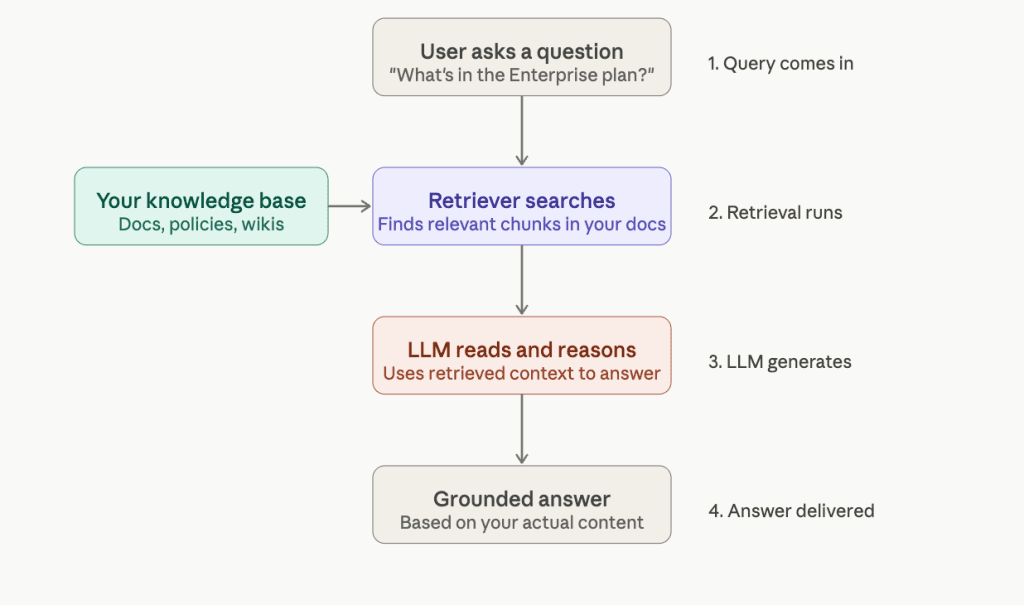
Ingestion and Chunking: How Documents Become Searchable Units
Before retrieval can happen, your documents need to be prepared. They get split into smaller pieces (chunks) so the system can find specific, up to date sections rather than entire files.
The tricky part is chunk size. If it’s too small, and the retrieved chunks lack context. Too large, and you pull in noise that confuses the model. Chunking documents into 200–500 tokens, combined with metadata filters, tends to produce the most reliable search results.
The real implementation decision here: don’t treat chunking as a one-time setup. Legal contracts chunk differently from help docs. Teams that set it once and forget it are usually the ones asking why answers feel off six months later.
Embeddings and Vector Storage: Making Content Searchable by Meaning
Each chunk gets converted into an embedding, a numerical representation of its semantic meaning. This is what allows the system to match a question to relevant content even when the exact words don’t overlap.
Those embeddings live in a vector database. The common choices are Pinecone, Weaviate, Qdrant, and Chroma.
Honestly, the choice of database matters less than the quality of what goes into it. A clean, well-structured knowledge base in any of these will outperform a messy one in the best option.
Retrieval, Reranking, and Generation: Where It Comes Together
When a question arrives, the system finds the most semantically similar chunks and passes them to the LLM alongside the original question. The model reads what was retrieved and answers from it, not from training data or memory.
One thing that makes a measurable difference: reranking. Before chunks reach the LLM, a reranker re-scores them for actual relevance. Adding a cross-encoder reranker typically improves answer quality by 15–35%, and it’s usually one of the first things we add when a system is returning technically correct but not quite useful answers.
RAG Use Cases: Advanced Search, Customer Support & More
RAG isn’t a solution looking for a problem. The use cases where it works best share a common thread: there’s a body of knowledge that’s too large, too specific, or too frequently updated for any model to carry in its head. Here’s where we see it deliver real value.
Enterprise Search
Most companies have years of knowledge scattered across Confluence, Notion, Google Drive, SharePoint, and a dozen other tools. Nobody can find anything. New employees spend weeks just learning where things live.
RAG turns that scattered knowledge into something queryable. Instead of searching for a document and hoping it’s the right one, people ask a question and get an answer, with a data source they can verify.
The teams we’ve worked with that implemented internal RAG search consistently report the same thing: onboarding gets faster, and senior people stop getting interrupted with questions that were already answered somewhere.
Customer Support
This is probably the most common starting point for RAG projects, and for good reason. Support teams deal with the same questions repeatedly, the answers live in help docs that change regularly, and the cost of a wrong answer is high.
A well-built RAG support assistant doesn’t replace agents. It surfaces the right documentation before the agent has to go looking, or handles the straightforward questions entirely, so agents focus on the ones that actually need a human. Workday’s adoption of RAG for employee policy Q&A is a representative example of how enterprises are personalizing assistants while keeping answers traceable to a source.
The implementation detail that matters most here: retrieval quality. A support assistant who retrieves the wrong document and answers confidently is worse than one who says they don’t know.
Document Q&A and Contract Review
Legal and finance teams live inside documents. Contracts, compliance reports, audit trails — the information is all there, but finding a specific clause across hundreds of pages is slow and error-prone.
RAG handles this well. You ask, “Does this contract include an automatic renewal clause?” and the system finds it, surfaces it, and tells you where it is. Our custom RAG development work in this space has shown that the time savings compound fast. What used to take a paralegal an afternoon takes minutes.
The implementation decision here is around the chunking strategy. Legal documents have structure, clauses, sections, definitions, and chunking that respects that structure, which retrieves far more precisely than naive paragraph splits.
Agentic RAG for Multi-Step Workflows
Standard RAG follows a single loop: retrieve, then respond. Agentic RAG chains that loop: retrieve relevant information, reason, act, retrieve again, repeating until a complex task is complete.
A practical example: a contract review agent that doesn’t just answer questions but reads an entire agreement, flags unusual clauses, cross-references your standard terms, and produces a summary with specific recommendations. It’s not one retrieval call but dozens, chained together with reasoning in between.
In 2025 and into 2026, agentic RAG started taking form for specific, well-bounded workflows, such as legal document parsing, information retrieval from specific tools, and structured data updates. The more complex multi-agent workflows are still maturing, but the foundation is already being laid in production systems today.
How to Build a RAG Application: Step-by-Step Overview
Every RAG project we’ve worked on has gone through the same sequence.
1. Define the Use Case and the Success Metric
Before touching any infrastructure, get specific about what success looks like. Not “the assistant should answer questions well” — that’s not measurable. What’s the acceptable latency? What retrieval recall are you targeting? How will you know if an answer is wrong?
Teams that skip this step build something, demo it, and then spend months arguing about whether it’s good enough. Define the target first.
2. Audit and Prepare Your Knowledge Base
This is the step that takes longer than anyone expects, and the one most directly responsible for whether the system works. Outdated documents, inconsistent formatting, duplicate content, and missing metadata all flow downstream into bad retrieval.
In our experience, data preparation is at least 60% of the actual work on any RAG project. A clean, well-structured knowledge base with mediocre retrieval will outperform a messy one with excellent retrieval every time.
3. Choose Your Chunking Strategy and Embedding Model
How you split your documents shapes everything that follows. The right chunk size depends on your content type, as discussed earlier, there’s no universal answer.
The embedding model matters, but improvements here have plateaued relative to other components. Most retrieval quality wins in recent years came from better reranking and retrieval design, not better embeddings. Choose a model that’s a good fit for your language and content domain, and don’t over-optimize it. If you’re building this in-house, this is also the stage where hiring AI developers with RAG-specific experience pays off most, early architecture decisions are hard to undo later.
4. Pick a Vector Database and Design Your Retrieval
As discussed, the choice between Pinecone, Qdrant, Weaviate, and Chroma matters less than how you structure what goes into it. What matters more at this stage is your retrieval design, how many chunks you return, whether you’re using hybrid search (semantic plus keyword), and whether you’re adding a reranker.
Hybrid search is worth considering early. Pure semantic search misses exact matches. Pure keyword search misses meaning. Combining both covers more ground, and adding a cross-encoder reranker on top typically improves quality by 15–35%.
5. Build the Prompt and Large Language Models Layer with Guardrails
How you structure the prompt (how retrieved context gets combined with the user’s question, what instructions the model receives, what it’s told to do when it doesn’t find contextually relevant information) has a bigger impact on output quality than most teams expect.
Guardrails matter here, too. The model should be instructed to answer only from retrieved context, to acknowledge when it doesn’t know, and to avoid synthesizing information across sources in ways that could introduce errors.
6. Evaluate, Monitor, and Iterate
This is the step that separates systems that stay good from systems that quietly degrade. Tools like RAGAS and LangSmith give you structured ways to measure retrieval relevance and answer quality over time.
RAG often fails in endless proofs of concept that never scale because pilots overlook what matters operationally once real users are involved. Evaluation isn’t a launch checklist item. It’s an ongoing practice.
This sequence is what we follow on every custom RAG engagement at SpdLoad. The details change project to project, but the order doesn’t. 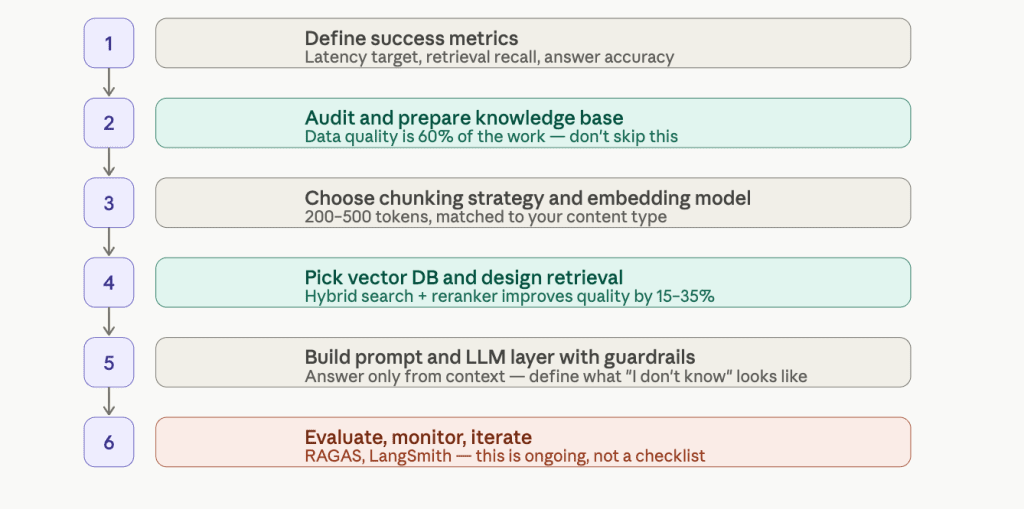
In this article, we talk more about custom AI vs off-the-shelf solutions.
Common Challenges of RAG Systems and How to Solve Them
No RAG system ships perfectly. Here are the four issues we run into most often.
Poor Retrieval Relevance
This is the most common one. The system returns results that are technically related to the question but not actually useful, and the model generates a response that sounds plausible but misses the point.
The fix is usually two things: hybrid search, which combines semantic similarity with keyword matching to cover more ground, and a reranker that re-scores results before they reach the model.
Most retrieval problems don’t need a better embedding model. They need better filtering of what’s already being retrieved.
Hallucinations
RAG significantly reduces hallucinations compared to a plain LLM, but it doesn’t eliminate them. The model can still drift when the retrieved context is thin, ambiguous, or contradictory.
The practical fix is in the prompt design. The model needs explicit instructions to answer only from retrieved context, and a clear path for what to do when the context isn’t sufficient: “I don’t have enough information to answer this reliably” is a better output than a confident wrong answer.
Around 40% of companies have already experienced an AI privacy or accuracy incident, and in most cases, it wasn’t the model that failed, it was the guardrails that were never built.
Latency
Retrieval capabilities add steps, and steps add time. For most use cases, a few hundred milliseconds is acceptable. For real-time applications, it isn’t.
The levers here are caching frequent queries, reducing the number of chunks passed to the model, and, where the use case allows, using a smaller, faster model for a first-pass response. You don’t always need a frontier model to answer a straightforward support question.
Cost
Simple RAG systems have two cost drivers that compound at scale: embedding generation and LLM inference. As query volume grows, both grow with it.
At high volume, routing routine user queries to a smaller fine-tuned model while sending edge cases to a frontier model can reduce costs by 70–90% compared to running everything through a large model. It’s not the first thing to build, but it’s worth designing for from the start.
RAG Costs and Timelines
Like in any AI development project budgeting, the biggest cost drivers on any RAG project aren’t the infrastructure. They’re data preparation, integration complexity, and evaluation rigor. A project built on clean, well-structured data with a clear success metric ships faster and cheaper than one where the knowledge base is a mess and nobody agrees on what “good” looks like.
Typical ranges:
| Stage | Typical cost | Timeline |
|---|---|---|
| Proof of concept | $15,000–$35,000 | 4–6 weeks |
| Production system | $60,000–$150,000 | 3–4 months |
| Enterprise deployment | $200,000+ | 6+ months |
What actually moves you toward the high end of each band:
- For a proof of concept: unstructured or poorly maintained source data; no clear success metric going in; multiple document types with different chunking requirements.
- For a production system: integration with existing auth systems, CRMs, or ticketing tools; access control requirements (not everyone should see everything); compliance requirements around logging and data residency; building evaluation infrastructure rather than just shipping and hoping.
- For enterprise: multi-tenant architecture; on-premise deployment; regulated industry requirements (HIPAA, SOC 2, FedRAMP); multiple internal systems that need to be connected and kept in sync.
The one thing worth saying plainly: projects go over budget at the data preparation stage more often than anywhere else. If your knowledge base needs significant cleanup before ingestion, build that into the estimate from the start, not as a contingency, but as a line item.
What are the Common Misconceptions About RAG?
That’s something I hear most of the time when talking with businesses that want to integrate the RAG system:
RAG eliminates hallucinations
It would be great, but it’s not 100% true. RAG helps significantly reduce them, but doesn’t eliminate them. The model can still generate unreliable outputs when the retrieved documents and content are sparse, contradictory, or only partially relevant. Guardrails, instructing the model to acknowledge uncertainty, are still required to eliminate such things.
Better embeddings are the main lever for better retrieval
Embedding quality matters, but improvements in this area have plateaued. Hybrid search and reranking typically produce larger quality gains than switching embedding models. If retrieval isn’t working well, that’s usually where to look first.
RAG means giving the model access to all your data
The model only sees what the retriever surfaces for a given query, a small set of relevant chunks, not your entire corpus. That’s a feature, not a limitation. It’s what makes RAG compatible with access control and data privacy requirements.
You can build it once and move on
RAG systems require ongoing attention as your knowledge bases go stale. Query patterns shift. Retrieval quality that was good at launch can degrade as documents are added inconsistently or updated without regard for how they’ll be chunked. Treat it like any production system: monitor it, measure it, and iterate.
RAG is just for Q&A
The question answering system interface is the simplest expression of RAG, but the architecture extends to multi-step reasoning, autonomous agents, and complex document workflows. If the only thing you’ve seen is a chatbot that answers questions from a help center, you’ve seen the surface.
If you’re evaluating RAG for your product, or trying to understand why a current implementation isn’t performing, a discovery conversation is usually the fastest way to get oriented. There’s no commitment involved, and the questions we ask tend to be useful regardless of what you decide to do next.