Restaurant Tech Stack in 2026: Systems, Integrations, and Architecture
- Updated: Jul 10, 2026
- 15 min

Senior Mobile Developer
At SpdLoad, we’ve been building software for restaurants of different sizes, and there is one thing we know for sure: a restaurant tech stack is never a random collection of tools. It’s an interconnected system that has to support the entire ecosystem that includes customer interactions, kitchen workflows, payments, inventory, data, and management decisions. Often all at once and under real-time pressure.
What that system should look like depends entirely on the business behind it. We’ve seen the same pattern repeat across many of these projects: a team picks tools first and figures out the architecture later, instead of the other way around. That order matters more than it seems.
Here, I’ll cover what SpdLoad considers a typical technology stack for the restaurant industry.
What Does a Restaurant Tech Stack Include?
The key components of a restaurant tech stack include:
- Customer-facing systems — website, mobile app, QR menu, kiosk, delivery platforms, and reservation management.
- POS (point of sale) and order management — the operational hub that receives and routes every order.
- Kitchen Display System (KDS) — turns incoming orders into a prioritized kitchen workflow.
- Integrated payments processing — card processing, digital wallets, split payments, and refunds.
- Inventory management — ingredient tracking, supplier orders, and stock-based menu availability.
- Customer Relationship Management (CRM) and loyalty tools — customer profiles, order history, rewards, and targeted campaigns.
- Analytics and back-office systems — reporting, accounting, and ERP connections.
The goal of the right stack is to create a reliable flow of data across the systems a restaurant actually needs.
What Is a Restaurant Tech Stack?
A restaurant tech stack is the full set of software systems a restaurant uses to run its operations, connected in a way that lets data move between them automatically.
It’s not the same as a technology stack in the engineering sense. That term usually refers to the programming languages, frameworks, and databases a piece of software is built with. For restaurant owners and managers, the most important thing is the business layer above that: which systems exist, what each one does, and how reliably they talk to each other.
That’s why it helps to think in terms of systems and data flows rather than individual products. The question isn’t which POS should we buy, but where does order data need to go after it’s created, and what breaks if it doesn’t get there. Restaurants that plan this way tend to scale more smoothly because adding a new channel or location means extending a known data flow rather than bolting on another disconnected app.
This is also where custom restaurant software development services tend to come in. With custom software, you can build the integration layer that makes existing systems work together, or fill a gap where no standard tool fits the business model.
Restaurant Tech Stack Diagram
The diagram below shows the six layers in the order in which data moves through them. I’ve put POS and restaurant order management system at the center, highlighted, because almost everything else depends on it. This is where customer channels hand off, and it’s the system that decides where an order goes next. 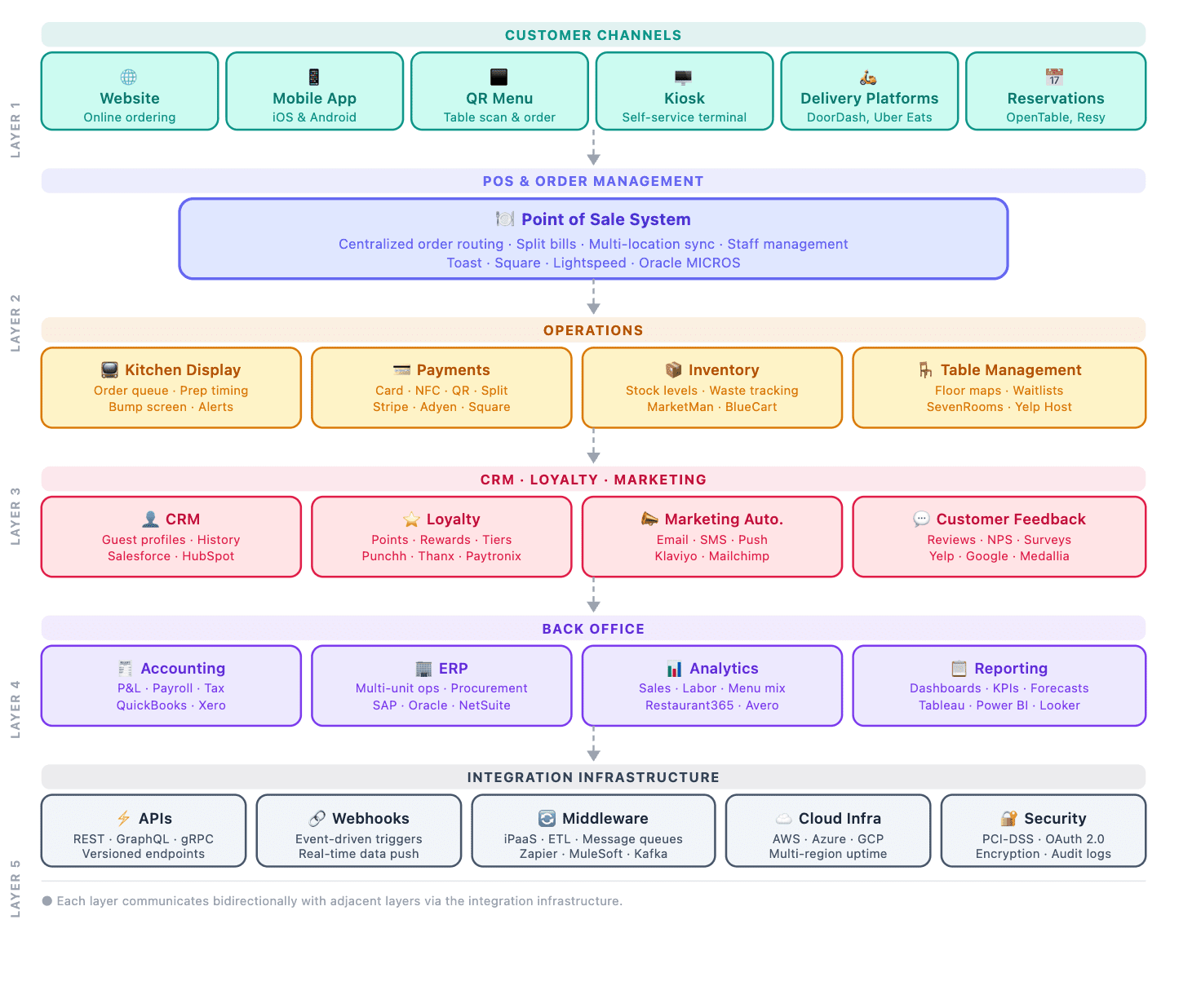
Here’s what happens at each layer:
- Customer channels capture the order through a website, app, QR menu, kiosk, or delivery platform.
- POS platforms and order management receive that order, validate it, and route it to the right place. This is the layer most restaurant operators interact with daily.
- Kitchen and operations turn the order into action: the kitchen sees it on a display, payment gets processed, inventory gets decremented, and the table or pickup slot gets tracked.
- Customer engagement picks up after the transaction, updating loyalty points, logging order history, and feeding marketing segments.
- Reporting and back office pulls numbers from every layer above it into dashboards, accounting entries, and ERP records.
- Integration and infrastructure is the layer most people never see, but it’s what makes the other five actually talk to each other — APIs, webhooks, middleware, and the security controls wrapping all of it.
Each layer of this restaurant technology ecosystem is a checkpoint where data either moves forward cleanly or gets stuck because two systems weren’t built to understand each other.
Connect ordering, POS, payments, inventory, CRM, and analytics in a system designed for your workflows.
The Core Layers of a Restaurant Technology Stack
Each row in this table is a layer with its own job. None of them works in isolation, as the value comes from how cleanly data passes from one to the next:
| Layer | Main systems | Business purpose | Typical integrations |
|---|---|---|---|
| Customer-facing | Website, mobile app, QR menu, kiosk, booking widget | Capture orders, reservations, and customer intent | POS, payments, CRM |
| Point of sales systems and order management | POS terminal, order routing engine | Validate and route every order to the right place | KDS, payments, inventory, delivery platforms |
| Kitchen operations | Kitchen Display System (KDS) | Turn orders into a prioritized prep workflow | POS, inventory, table ordering and management |
| Payments | Payment gateway, digital wallets | Process transactions securely across channels | POS, accounting, fraud detection |
| Inventory and supply chain management | Inventory management software | Track stock, ingredients, and supplier orders | POS, menu engine, accounting |
| Reservations and tables | Booking system, table management | Manage seating, walk-ins, and turnover | CRM, POS, customer profiles |
| CRM, loyalty, engagement | CRM platform, loyalty app | Build customer profiles and repeat visits | POS, marketing automation, analytics |
| Reporting and back office | BI dashboards, accounting software, employee scheduling tools, ERP | Turn operational data into business decisions | POS, CRM, inventory, payments |
Let’s explore each of these layers in more detail.
Customer-facing systems
This is where a guest first interacts with the restaurant digitally. It can be through a website, a mobile app, a QR menu solution, a self-service kiosk, or a delivery platform’s interface. For booking ahead, a reservation widget fits in here too.
The technical complexity varies a lot. A static website with a PDF menu is a different build than a branded ordering app with push notifications and saved payment methods. What matters for planning purposes is that whichever channels a restaurant offers, they all need to feed the same order pipeline downstream. Otherwise, the staff ends up checking three different screens to catch every incoming order. We talk more about customer-facing systems in this restaurant app development guide.
POS and order management
The POS is usually the busiest system in the entire stack, because it’s the point where every channel converges. Dine-in, takeaway, pickup, delivery, kiosk, and QR-based orders all need to land in the same place, get validated, and get routed to the kitchen without delay.
A restaurant POS integration that does this well also keeps order statuses in sync — “preparing,” “ready,” “out for delivery” — across every screen that needs to know, from the kitchen display to the customer’s tracking page. A POS that does this poorly creates a gap where staff have to manually check three different systems to confirm whether an order actually went through.
Kitchen operations
Once an order reaches the kitchen, a Kitchen Display System replaces the paper ticket. Orders show up in sequence, get prioritized by prep time, and get marked complete by the station, which matters most during a dinner rush when ten tickets are open at once.
A good KDS also closes the loop back to the front of house. When a dish is marked ready, the server or pickup counter should know immediately, without anyone walking back to the kitchen to check. That communication layer between front-of-house and back-of-house is often the difference between food going out fresh and food sitting under a heat lamp.
We’ll cover kitchen display system development in full in a future article. For now, the main point is that the KDS needs to be wired into the same order data as the POS, not running as a separate system fed by manual entry.
Payments
Payments touch every channel: card payments at the table, digital wallets at the counter, split bills for group dining, and refunds when something goes wrong. Regional payment providers add another layer of complexity. A stack built for the US market often needs different rails for European or Asian markets.
Security matters here more than almost anywhere else in the stack. Payment data has to be handled in a way that meets PCI compliance, regardless of which channel the transaction came through.
A useful real-world example is our QR menu and payment solution for HoReCa, where ordering and payment were combined into a single flow. A guest scans a code, orders, and pays without ever needing a server to bring a card machine to the table. That kind of consolidation only works when payments are treated as a layer connected to the rest of the stack, not a bolted-on checkout page.
Inventory and supply management
Inventory connects what’s in the kitchen to what’s on the menu. When a key ingredient runs low, the system should be able to flag the dish as unavailable automatically, instead of a server finding out mid-order that the kitchen is out of salmon.
Beyond availability, inventory data feeds supplier ordering and waste tracking. These are two areas where small restaurants often lose margin without realizing it. The point worth taking away now is that inventory only becomes useful when it’s connected to live order data. That’s the key to restaurant inventory management software development.
Reservations and table management
Bookings, walk-ins, waitlists, and table turnover all sit in this layer. For a high-volume restaurant, the difference between a table management system that’s connected to customer profiles and one that isn’t shows up directly in service quality. A host who can see that a guest is a regular or has a dietary note on file can act on that information instead of starting from zero every visit.
Online ordering in particular tends to get underestimated here. Building it well involves more than a menu and a checkout button, which is why we’ve written a separate guide to building a food delivery app covering that build in detail.
This layer tends to be simpler than the others architecturally, but it’s still worth connecting to the CRM rather than running as a standalone booking widget.
CRM, loyalty, and customer engagement
This is where a restaurant turns individual transactions into a relationship. Customer profiles, order history, reward points, and segmentation all live here, and they’re what make personalized campaigns that enhance customer experience (like a “we miss you” offer to a lapsed regular, or a birthday discount tied to an actual purchase history) possible.
It’s important to note that loyalty only works as a retention tool when it has real order data behind it. This is the core principle behind restaurant loyalty app development.
Reporting, accounting, and ERP
This is the layer that turns daily operations into business decisions. Sales reporting dashboards, staff performance, profitability by dish or location, and accounting entries all draw from the systems above. For chains and franchises, this is often where ERP systems come in, consolidating data across locations into a single view.
The quality of reporting is only as good as the data feeding it. A stack with disconnected systems produces reports with gaps when sales numbers don’t match inventory drawdown, or loyalty data doesn’t reflect actual delivery orders. Getting this layer right usually means fixing the layers below it first.
How Restaurant Systems Exchange Data
The systems described above only create value if they can pass information between each other reliably. That’s the job of a small set of technical mechanisms working in the background. I’m talking about APIs, webhooks, and middleware.
- APIs are how one system asks another system for data or sends it data, on request.
- Webhooks flip that pattern around. Instead of asking “is there a new order yet?” every few seconds, a system gets notified automatically the moment something happens.
- Middleware sits between systems that don’t speak the same data format natively, translating and routing information so the POS, CRM, and inventory system don’t all need to understand each other’s internal structure directly.
A few things tend to determine whether this layer works well in practice:
- Data mapping — making sure a “completed order” in the POS means the same thing as a “completed order” in the CRM, with the same fields carrying the same meaning.
- Bidirectional synchronization — updates need to flow both ways. If a customer’s loyalty points change in the CRM, the POS should reflect that on their next visit, not just the other way around.
- Error handling — networks fail, APIs time out, and a good integration layer retries or queues failed requests instead of silently dropping them.
- Duplicate prevention — without careful handling, the same order can get created twice if a webhook fires more than once or a sync job re-runs.
- Data ownership — every piece of information needs one clear “source of truth.” If both the POS and the loyalty app think they own the customer’s contact details, conflicts are inevitable.
Here’s what this looks like end-to-end, for a single order:
A customer scans a QR code at the table and places an order. That order gets sent to the POS, which validates it and pushes it to the kitchen display screen. Once the order is paid, the transaction is recorded in the analytics system, and the customer’s profile is updated with their order history. All within the same few seconds, without anyone re-typing anything. 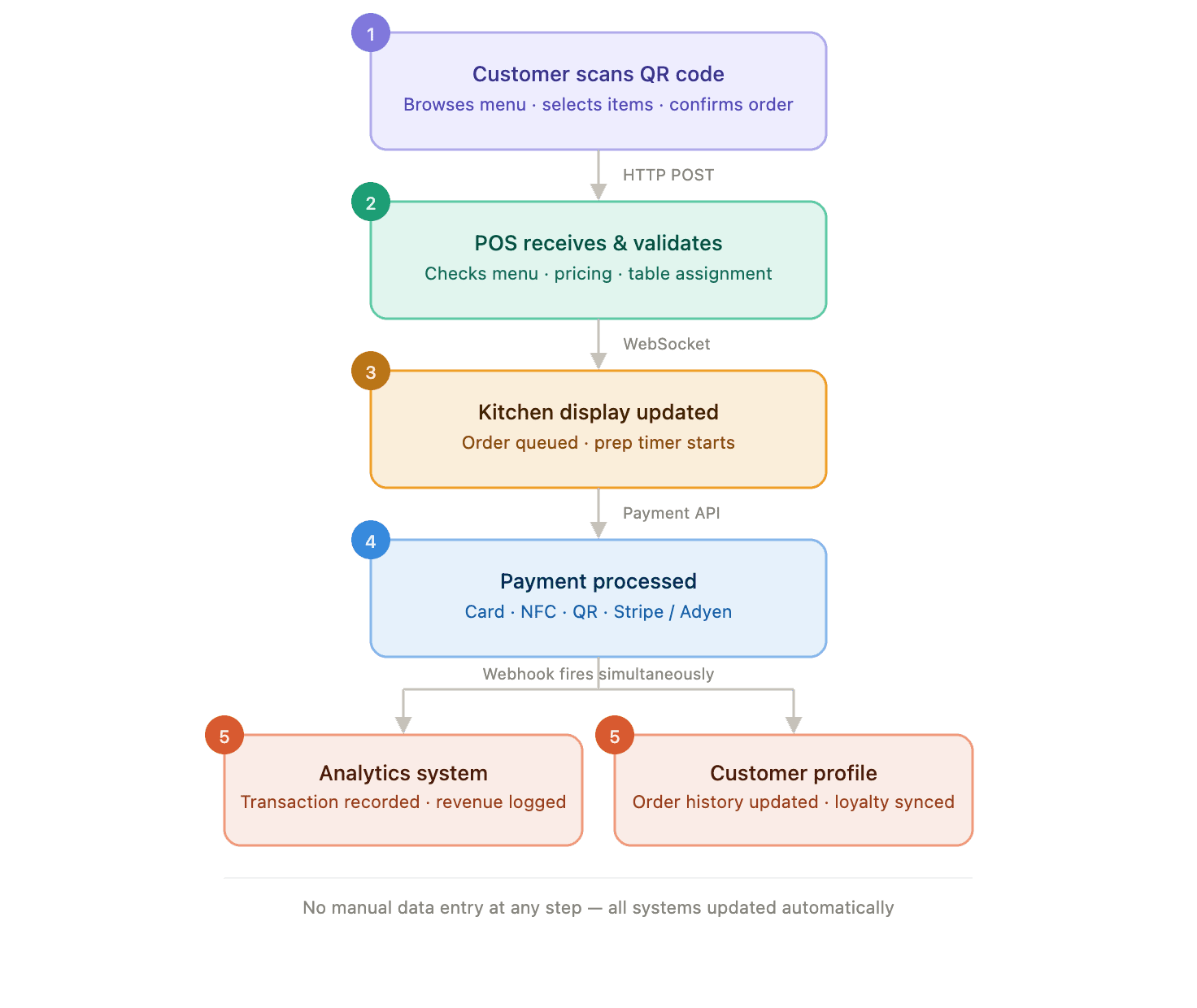
When that flow works, it’s invisible. When it doesn’t, say, the webhook from the QR ordering app to the POS fails silently, the kitchen never sees the order, and the first sign of a problem is a confused customer asking where their food is.
Restaurant Tech Stack for Different Business Models
There’s no universal stack that fits every restaurant business. What’s essential for a hotel restaurant might be optional for a single café, and what’s a minor convenience for an independent restaurant becomes a core requirement for a chain managing data across dozens of locations.
Here’s how the restaurant software ecosystem looks like, depending on the business type:
| Business type | Essential systems | Optional systems | Main complexity |
|---|---|---|---|
| Independent restaurant | POS, basic KDS, payments | CRM, loyalty app | Keeping costs proportional to scale |
| Café | POS, payments, simple inventory | Loyalty, online ordering | Fast transaction speed at low ticket size |
| Restaurant chain | POS, centralized inventory, CRM, reporting | Custom loyalty, predictive ordering | Consistent data across locations |
| Franchise | POS, centralized reporting, brand-standard menu system | Franchisee-level analytics access | Balancing local flexibility with brand control |
| Hotel restaurant | POS integrated with hotel PMS, online reservation systems | Room-charge billing, multi-outlet reporting | Integration with non-restaurant hotel systems |
| Delivery-first business | Order aggregation, kitchen routing, delivery dispatch | Customer app, loyalty | Managing multiple delivery platform integrations |
| Food-tech marketplace | Multi-vendor order routing, payments splitting, vendor dashboards | Recommendation engine, vendor analytics | Coordinating many independent restaurant partners on one platform |
Modular, All-in-One, or Custom Restaurant Software?
Once the layers and business model are clear, the next question clients usually ask is: should I build this with one all-in-one platform, stitch together several specialized tools, or build something custom?
Each approach makes sense, and the right choice depends on things like the business’s complexity, growth plans, and how unusual its workflows are.
| Approach | Benefits | Limitations | Suitable for |
|---|---|---|---|
| All-in-one platform | Fast setup, single vendor, predictable pricing | Limited flexibility, harder to customize workflows | Independent restaurants, cafés, simple single-location setups |
| Multiple integrated tools | Best-in-class tool for each function, more flexibility | Integration overhead, multiple vendors to manage | Chains with specific needs per function, growing businesses |
| Custom system or custom integration layer | Built around actual workflows, full data ownership, scalable | Higher upfront investment, longer development time | Multi-location chains, franchises, marketplaces, unusual operating models |
Practical AI Use Cases in a Restaurant Tech Stack
AI comes up in almost every restaurant technology conversation I have these days, often vaguely. I’ve learned to ask a more specific question before getting excited about it:
Which problem does it solve?
and
Is there enough data behind it to make it work?
Over the years, a handful of AI for restaurant operations use cases have proven themselves to me in practice:
- Recommendation systems. Based on order history and preferences, surfacing dishes a customer is more likely to order, whether inside a restaurant’s own app or on a platform aggregating menus from many restaurants.
- Demand forecasting. Predicting how busy a given day or shift will be, based on historical patterns, to help with staffing and prep quantities. I’ve seen this matter far more for chains with high order volume than for a single small location, where the data simply isn’t large enough to forecast reliably.
- Personalized offers. Tailoring promotions to actual behavior instead of sending the same offer to everyone.
- Inventory forecasting. Predicting ingredient usage to reduce both waste and stockouts. This is particularly valuable for restaurants with perishable stock and tight margins.
- Customer support automation. Handling common questions like order status, menu details, or hours through automated responses to free up staff time for issues that actually need a person.
- Anomaly detection. Flagging unusual patterns, like an inventory count that doesn’t match expected usage or a sudden spike in refunds, so a problem gets caught early instead of surfacing weeks later in a reconciliation report.
The recommended use case is one I’ve worked on directly. On our AI-powered food discovery platform project, my team and I built a platform that helps people discover restaurants and dishes through personalized recommendations. 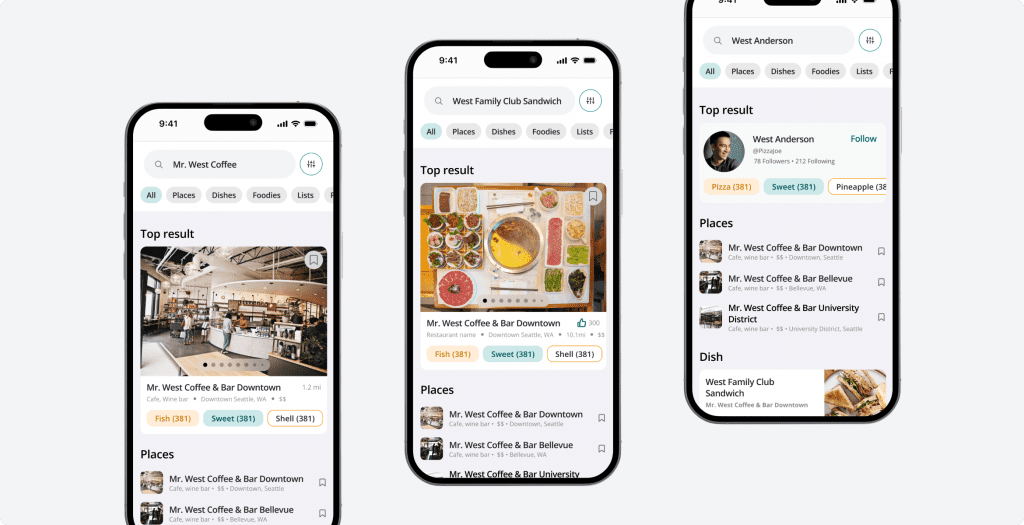
I was surprised how much of the real work had nothing to do with the recommendation logic itself: the menu data came from many different sources, inconsistently formatted, with missing categories and no reliable dietary tagging.
We spent a lot of effort just cleaning and standardizing that data before any recommendation could run on top of it. I came out of that project with a rule I still apply to every AI feature I scope now: the model is rarely the hard part, the data pipeline feeding it is.
We also had to be deliberate about cost, which meant managing API usage carefully and caching frequently requested results so the platform stayed fast without reprocessing the same queries over and over.
That experience is also why I’m cautious when a client asks for AI features before their underlying data is in good shape. AI doesn’t fix a fragmented system, as many might think. It amplifies whatever data quality already exists, good or bad. I’d rather spend the first few weeks of a project on the data layer than build a smart feature on top of a shaky foundation.
Common Restaurant Technology Stack Mistakes
Most of the problems we see in restaurant tech stacks don’t necessarily come from bad individual tools. Here are the patterns that show up most often.
Buying tools before mapping workflows
A restaurant adopts a new POS, loyalty app, or KDS because it looked good in a demo, without first writing down how orders, payments, and customer data actually need to move through the business. The tool gets bent to fit afterward, which rarely goes smoothly.
Treating integrations as an afterthought
Two systems get purchased separately, and only after both are live does anyone ask how they’ll share data. By then, the integration work costs more and takes longer than if it had been planned from the start.
Failing to define a source of truth
When more than one system claims to “own” the same piece of data, a customer’s contact info, a menu item’s price, conflicts are inevitable. Someone updates the price in the POS, forgets to update it in the online ordering app, and a customer gets charged the wrong amount.
Ignoring offline scenarios
Internet connections drop. Card readers lose signal. A stack that has no fallback for these moments leaves staff stuck mid-transaction with no way to complete an order. An offline mode is a must.
Creating duplicate customer records
Without a shared customer identifier across systems, the same person can end up as three separate profiles, one from the loyalty app, one from online ordering, and one from a phone reservation, none of which reflect their full history.
Ignoring multi-location requirements
A stack built for one location, then expanded to five without rethinking the architecture. Without a reliable multi-location restaurant management software, the business can end up with inconsistent menus, reporting that doesn’t roll up cleanly, and no centralized view of performance.
Selecting tools without export options
Some platforms make it easy to get data in and hard to get it out. This becomes a real problem the moment a restaurant wants to switch vendors or connect a new system.
Collecting data without actionable reporting
A stack can generate enormous amounts of data: every order, every customer interaction, that nobody actually looks at or uses for a decision. Data that doesn’t inform a choice isn’t really an asset yet.
How to Plan a Restaurant Technology Stack
I always tell my clients that planning a stack well takes more time upfront than buying tools as needs come up, but it saves far more time later. Here’s a practical sequence that works across most restaurant business types: 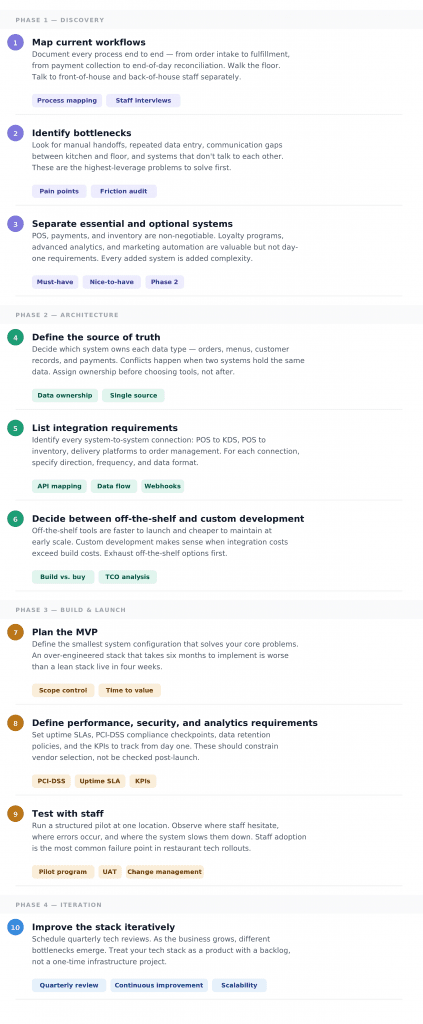
Build Your Restaurant Software Stack
After working through enough of these projects, I keep coming back to the same conclusion: the right restaurant technology architecture always follows the business’s specific workflows rather than a generic template pulled from a vendor’s marketing page.
In my experience, custom development becomes a reasonable path once standard tools genuinely can’t support the business model anymore. That happens when:
- Workflows are unusual enough that no off-the-shelf platform anticipated them.
- Integration complexity has outgrown what those platforms were built to handle.
- Owning the data and the customer relationship matters more than the convenience of a packaged tool.
I wouldn’t call it the default choice since most restaurants don’t need it. But for the ones that have outgrown generic tools, I’ve found it’s often the only way to end up with a stack that actually fits, rather than one they’re constantly working around.
If you’re mapping out what your own stack should look like, working with a restaurant software development company before committing to specific platforms tends to save both time and rework later. Feel free to contact us for a quick conversation about your restaurant’s digital infrastructure.