How to Integrate LLMs Into Enterprise Software: Architecture, Security, and Costs
- Created: Jul 16, 2026
- 18 min

Senior Devops
We’ve worked on a handful of enterprise LLM (large language model) projects at SpdLoad, and I’ve noticed one thing that happens most of the time we provide natural language processing services:
A client comes to us asking for an AI assistant, but once we start talking, it becomes clear they need something more thought-through than that. Usually, it’s a model that knows which data it’s allowed to touch, who’s asking, and what to do when it isn’t sure of the answer.
In this guide, I want to walk you through how we think about this at SpdLoad, including:
- The core components of an enterprise LLM system.
- How to connect a model to the tools you already run.
- What security and data privacy require.
- How we test quality before anything goes live.
- How a rollout should be staged so nothing breaks on day one.
My goal is to give you something practical enough to bring into your own planning conversations.
Core Components of an Enterprise LLM System
Before getting into the details, it helps to see the whole picture at once. Every enterprise LLM setup (no matter the vendor or use case) is built from the same handful of parts. Here’s how they connect: 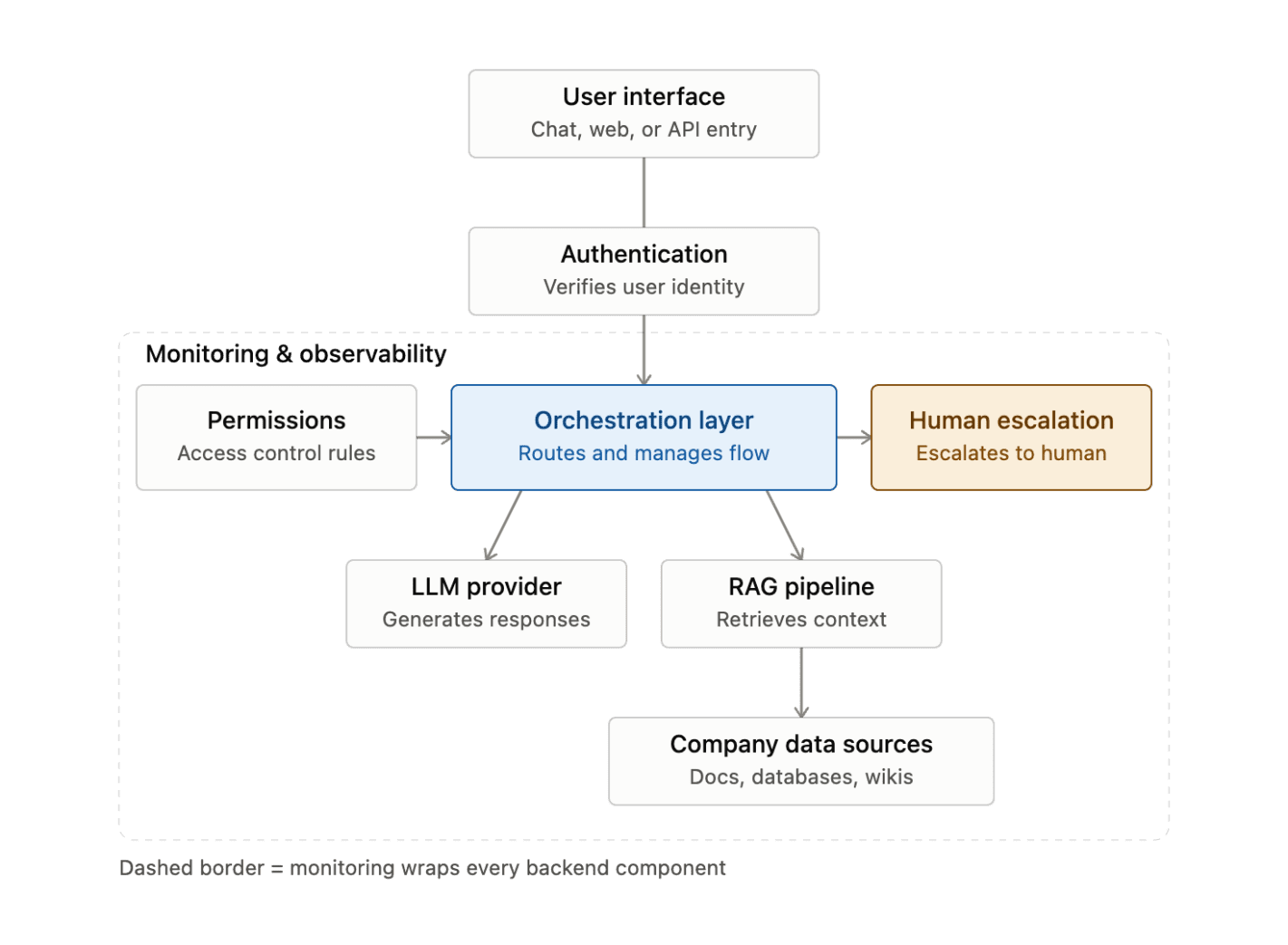
What Does Enterprise LLM Integration Mean?
Enterprise LLM integration means connecting a language model to your company’s real environment:
- Enterprise data
- Permissions
- Existing software
- Business processes
so the model’s output is trustworthy enough to act on.
Here’s how it works:
Say a mid-sized logistics company wants an internal assistant that helps dispatchers answer client questions faster. Theoretically, that’s add an LLM type of task.
In practice, it means the model needs to read from the company’s order-management system, respect that a dispatcher in one region shouldn’t see contracts from another, log every answer for compliance, and hand off to a human when a client asks something involving money or a legal term.
Common Enterprise LLM Use Cases
Once a company has the architecture in place, the same system underneath it supports some common use cases. Here are the ones I see most often, roughly in order of how frequently teams start with them:
| Enterprise AI use case | What it does | Note |
|---|---|---|
| Internal knowledge copilot | Employees ask questions in plain language and get answers pulled from company documents | The first generative AI project a company starts with |
| Document search | Finds the right document fast, rather than generating a full answer | Legal teams searching contracts, engineers searching technical specs |
| Customer support assistance | Drafts or suggests responses for support agents to review before sending | Rarely recommended to respond to customers directly without a human in the loop |
| Employee onboarding | New hires ask questions about benefits, tools, or internal processes | A low-risk place to start. The stakes of a wrong answer are (usually) small |
| Policy Q&A | Answers questions about compliance and internal policy, with source citations | Expense rules, data handling requirements, and other areas where accuracy matters more |
| Workflow automation | Triggers or assists with multi-step processes | Drafting a ticket, filling a form, routing a request to the right team |
| Document summarization | Turns long documents, transcripts, or threads into short, readable summaries | One of the more reliable use cases, since the model works only from the text it’s given |
| Extraction | Pulls structured data out of unstructured text | Invoice numbers from PDFs, key terms from contracts, action items from emails |
| Classification | Sorts incoming requests, tickets, or documents into categories automatically | Often feeds directly into workflow automation |
| CRM assistance | Drafts follow-ups or summarizes a customer’s history using data pulled from the CRM | Flags accounts that need attention based on recent activity |
Most companies pick one use case, usually the knowledge copilot or document search, and expand from there.
Choose the Right Integration Architecture
This is the decision that shapes almost everything downstream, including cost, security posture, how fast you can launch, and how much control you keep over the model’s behavior.
The right choice here depends on your data sensitivity, existing infrastructure, and how much engineering capacity you have.
Let’s explore the options in more detail.
External LLM API gateway
You send requests to a provider like OpenAI or Anthropic and get responses back. This is the fastest way to start. There is no infrastructure to manage, and you’re always using an up-to-date model.
The tradeoff is that your internal data leaves your environment on every call, so you need to be deliberate about what you send. Also, you become dependent on the provider’s uptime and pricing.
Private cloud deployment
Here, you run the model inside your own cloud environment, or a provider’s isolated instance dedicated to you.
This gives you tighter control over data residency and compliance, which matters a lot in regulated industries like healthcare or finance.
However, private cloud costs more and takes longer to set up, and you’re often responsible for keeping the model reasonably current.
RAG architecture
Rather than retraining or fine-tuning a model on your data, you retrieve relevant information at the moment of the question and hand it to the model as context.
This is the architecture behind most knowledge copilots and document-search tools, and it’s the one we recommend for most companies starting out. Why? Because it keeps your data separate from the model itself and makes answers traceable back to a source. I’ll go into more depth on how this works in the next section.
Hybrid approach
Many real systems mix the above – an external API for general reasoning, paired with a private RAG layer that only ever touches sensitive data locally, so nothing confidential is sent externally.
This is common when a company wants the quality of a frontier model but can’t send certain data outside its own walls.
Agentic workflows
Here, instead of just answering a question, the model takes actions. For example, creates a ticket, updates a CRM record, or triggers an approval.
This is powerful, but it also raises the stakes considerably, since the cost of wrong action is much higher than the wrong answer.
If you’re exploring AI agent development services, it’s worth reading about how to build an AI agent for business before committing to it. Agentic systems need their own guardrails around what actions are allowed and who approves them.
Most companies we work with start with RAG on an external API, keep the scope narrow, and only move toward private deployment or agentic workflows once the simpler version has proven itself.
We design a secure architecture around your workflows, access permissions, and knowledge sources
How RAG Connects an LLM to Enterprise Knowledge
Since RAG comes up in almost every enterprise setup I’ve described so far, it’s worth explaining how it works, step by step. If you want the deeper technical version, we’ve written a full RAG-based AI applications guide. In this section, I focus on how it fits into the broader integration picture.
The idea behind RAG for enterprise is simple: instead of expecting the model to already know your company’s information, you fetch the relevant pieces at the moment someone asks a question and hand them to the model as context. The model still writes the answer, but it’s grounded in real, current documents rather than whatever it happened to learn during training.
Here’s what that process looks like in practice.
- Document ingestion.
Your documents (PDFs, wiki pages, spreadsheets, support tickets, whatever holds the knowledge) get pulled into the system on a regular basis, so the assistant isn’t working from a stale snapshot.
- Chunking where appropriate for retrieval.
Long documents get split into smaller pieces. This is important because a whole 40-page policy document isn’t useful context for the model, but the three paragraphs that answer the question are. The right chunk size is one of the more common places projects go wrong early on.
- Embeddings.
Each chunk gets converted into a numerical representation that captures its contextual meaning. This is what lets someone ask How do I expense a client dinner? and still match a document that says Reimbursement for business meals.
- Vector storage.
Those numerical representations get stored in a vector database, built specifically for finding similar meanings quickly, even across millions of chunks.
- Retrieval.
When someone asks a question, the system converts that question into the same kind of numerical representation and searches the vector database for the closest matches – the chunks most likely to contain the answer.
- Grounded answer generation.
The retrieved chunks get handed to the model along with the original question, and the model writes an answer using that specific information.
- Source citations.
A well-built system shows where each part of the answer came from, so a person can verify it rather than take it on faith. This one detail does more for trust than almost anything else in the system.
- Knowledge updates.
As documents change, get added, or get retired, the vector database needs to stay in sync. Otherwise, the assistant starts citing information that’s no longer true.
If you’re building this yourself, make sure you dedicate some time to tuning retrieval quality. If you’d rather have that handled for you, this is the kind of work our custom RAG development services team does regularly.
Connect the LLM to Existing Enterprise Systems
The real value of a knowledge assistant shows up once it can reach into the systems your team already works in every day. This is usually the part of the project that takes the most engineering effort, simply because every company’s systems are wired together a little differently:
- CRM. Pulling customer data, deal status, or contact details lets the assistant draft follow-ups or answer “where do things stand with this client” without someone opening three tabs to check.
- ERP. Connecting to inventory, order, or financial systems lets the assistant answer operational questions (stock levels, order status) that used to require a report or a spreadsheet.
- Help desk. Ticketing systems are a natural fit, since the assistant can summarize open tickets, suggest responses, or route new ones to the right queue.
- Shared drives. Google Drive, SharePoint, or similar tools usually hold a huge share of a company’s real knowledge, scattered across folders nobody fully remembers the structure of. Indexing these properly is often where teams find the most immediate value.
- Internal portals. Company wikis, HR portals, and intranets tend to hold policy and process information that changes often enough that keeping it current matters as much as connecting it in the first place.
- Databases. Direct connections to internal databases let the assistant answer questions that require structured data (counts, aggregates, specific records) rather than free-text search.
- API integrations. Most of the systems above are reached through their own APIs. If a system doesn’t expose an API cleanly, that’s often the actual bottleneck of the whole project, more than anything related to the model itself. This is where solid API development and integration work makes the rest of the project go smoothly.
- Identity providers. Tying the assistant into your existing identity system like Okta, Azure AD, or similar means the assistant already knows who’s asking. This is the foundation on which everything in the next section depends.
One thing I’d flag from experience is that it’s tempting to want to connect everything on day one. I’d push back on that.
Every new system you connect is another thing that can break and another source of stale data if it’s not kept in sync. Start with two or three systems that matter most for your existing business processes, and then expand once those are solid.
Data Security and Privacy Requirements
This is the section I’d encourage you not to skim, even if the rest of the article feels more interesting.
Security gaps in an LLM system don’t usually show up as a dramatic failure. They show up quietly, as an employee seeing information they shouldn’t, or a model repeating something it was never supposed to have access to. By the time someone notices, it’s already happened.
To avoid this, here are some measures we implement when working with clients’ projects:
| Requirement | What it means | Why it matters |
|---|---|---|
| Role-based permissions | The assistant only retrieves and uses information the requesting person is actually allowed to see | If permissions aren’t checked at query time, the model can cite a document from a folder the user never had access to |
| Sensitive data handling | Information like salaries, health data, customer interactions, or legal matters gets stricter treatment than general company knowledge | Some data shouldn’t be indexed for broad retrieval at all, even internally |
| Encryption | Data is encrypted both in transit and at rest | Standard practice for enterprise software, but worth confirming explicitly with any LLM provider or vector database, since not all handle it the same way by default |
| Audit trails | Every query, retrieval, and response is logged in a way that lets you reconstruct what happened later | Matters for compliance, but also just good practice. When something goes wrong, you want to know exactly what the assistant saw and said |
| Retention | A deliberate decision on how long conversation logs, retrieved documents, and generated answers are kept | Avoids defaulting to “forever” or to whatever a provider does automatically by default |
| Data isolation | One department’s, client’s, or business unit’s data can’t leak into another’s retrieval results | Especially important if you serve multiple groups from the same system, or ever plan to offer the assistant externally |
| Approval workflows | A human confirms before the assistant’s output leads to an action, like sending an email, updating a record, or approving a request | Keeps a person in the loop until the system has a track record, since a mistake here is an action |
| Prompt injection mitigation | Retrieved content is treated as data, not as instructions | Someone can embed hidden instructions inside a document or ticket, hoping the model follows them instead of the actual user’s request. This should be tested before launch |
| Human review | A person spot-checks a sample of the assistant’s answers, especially early on | Catches problems automated testing tends to miss, like tone issues, subtle inaccuracies, answers that are technically correct but unhelpful |
How to Evaluate LLM Quality Before Launch
A structured evaluation, done before launch, catches problems while they’re cheap to fix.
To make this less abstract, I’ll walk through each step using the same kind of example throughout – an internal HR policy assistant, since it’s a use case most teams can picture.
Create a test set
Pull together a set of realistic questions people will ask. Include edge cases, ambiguous phrasing, and questions the assistant genuinely shouldn’t be able to answer.
For the HR assistant, that might mean including a straightforward question like How many vacation days do I get?, but also a vaguer one like Can I carry over time off?, and a trap question like What’s my coworker’s salary?.
Define expected answers
For each question in your test set, write down what a correct answer looks like. This step is more work than it sounds, but without it, the quality of the outputs remains a feeling rather than something you can measure.
The expected answer for How many vacation days do I get? question shouldn’t be just 20 days. It’s the correct number for that employee’s specific contract type and tenure, since HR policies often vary by role or seniority.
Assess factual correctness
Run the test set through the system and check each answer against your expected answers. This is where you’ll catch hallucinations – cases where the model states something confidently that isn’t actually true.
If the HR assistant answers, “You get 25 vacation days,” when the policy document says 20, that’s a factual error that needs to be fixed before an employee planning time off relies on it.
Measure retrieval quality
Separately from the final answer, check whether the RAG pipeline pulled the right documents in the first place. A wrong answer is often a retrieval problem wearing a hallucination costume. When the model did fine with what it was given, it was just given the wrong thing.
In this case, that 25-day answer might trace back to the assistant retrieving last year’s outdated policy document instead of the current one. That’s a retrieval failure, not a model failure, and the fix is different depending on which one it is.
Test permissions
Log in as different users with different access levels and confirm each one only sees what they’re supposed to.
A manager asking the HR assistant What’s the average salary on my team? should get an answer. But the same question from a regular employee should get a polite refusal, not a partial answer with some numbers redacted and others not.
Test edge cases
Ask questions with no good answer in the knowledge base, ask the same question in different ways, and try a few prompt injection attempts. A system that says I don’t have that information is doing its job. But if it makes up a story, it needs to be fixed.
You can ask the HR assistant about a policy that doesn’t exist yet, like What’s our new remote work stipend?, and confirm it says it doesn’t have that information instead of inventing a plausible-sounding number for you.
Measure latency
Check how long answers take, especially for questions that require multiple knowledge retrieval steps or hit several connected systems. A technically accurate answer that takes twenty seconds will still frustrate people.
Monitor cost per request
Track token usage per query type before launching. This gives you a baseline to compare against once real usage starts, and it flags expensive query patterns while you can still redesign them.
I’d treat this evaluation less like a one-time gate and more like a habit. Rerun the test set whenever you update the knowledge base or add a new connected system.
Roll Out the Integration in Stages
Every successful LLM integration project I’ve been part of followed some version of this path:
Discovery
Before any code gets written, spend real time understanding what problem you’re actually solving, which internal systems and proprietary data matter most, and who the first users will be. This stage feels slow, but rushing it usually means rebuilding decisions later that could have been made once, correctly, at the start.
One-department pilot
Pick a single team to work with first. A smaller, motivated group gives you honest feedback faster, and mistakes stay contained while you’re still learning what actually breaks in a real enterprise setting.
Limited knowledge base
Start with a narrow, well-understood set of processed data rather than indexing everything you have. It’s tempting to connect every source at once so the assistant feels more capable, but a smaller, accurate knowledge base earns trust faster than a large, messy one, and it’s far easier to keep strict access controls in place while the scope stays small.
Evaluation
Run the test set described in the previous section against real pilot usage, not just your original hypothetical questions. Real users ask things you didn’t anticipate, and that’s exactly the training data you need before expanding.
Controlled rollout
Once the pilot holds up, expand to more users or departments gradually, watching how quality and cost behave at each step rather than jumping straight to company-wide access. This is usually where the assistant starts to answer employee queries reliably enough to actually boost productivity, rather than just feel like a demo.
Additional workflows
Once the core use case is stable, this is the point to extend into customer support workflows, connect another internal system, or add a use case like code generation for the engineering team, one at a time, so you can tell what caused any change in behavior.
Some companies use this stage to build toward scalable LLM-powered applications that go beyond a single department, laying groundwork that supports the business at enterprise scale.
Monitoring and improvement
This isn’t really a final stage so much as an ongoing one. Usage patterns shift, documents go stale, and the pre-trained or proprietary models behind the assistant get updated by their providers on their own schedule.
A system that was accurate at launch needs regular attention, including basic data analysis on how it’s actually being used, to stay that way. Companies that treat this as routine tend to see the benefit show up in real terms: better customer satisfaction, less time spent on repetitive questions, and a small but real competitive edge over teams still doing this work by hand. 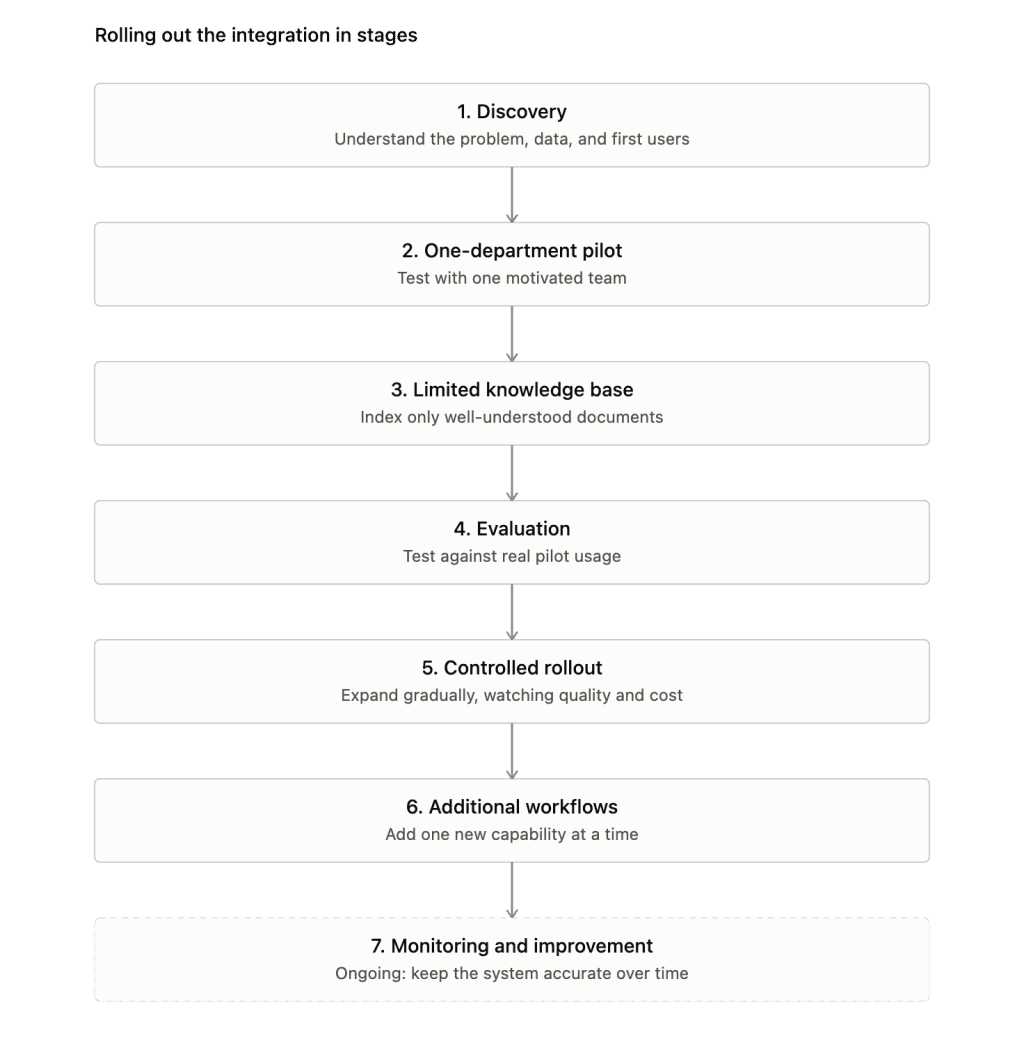
The teams that get frustrated with AI integration with existing systems are usually the ones that tried to launch company-wide on day one, with every data source connected and every use case live at once.
It’s a natural instinct, the technology feels ready, so why wait? But the slower path is the one that actually holds up once real people start depending on it every day.
Enterprise LLM Integration Cost Drivers
I won’t go deep into exact numbers here, since costs vary a lot depending on scope, and we’ve written a full breakdown in our guide to estimating AI development costs. But a few factors consistently drive the budget on projects like this, and it’s worth seeing them laid out together before you start planning.
| Cost driver | What it covers | Why it moves the budget |
|---|---|---|
| Number of connected systems | CRM, ERP, help desk, shared drives, internal portals, databases | Each integration needs its own authentication, testing, and ongoing maintenance |
| Knowledge base size and complexity | Volume of documents, number of formats, and how scattered the sources are | A narrow, clean set of documents is far cheaper to set up and keep current than a large one spread across wikis, PDFs, and old files |
| Architecture choice | External API vs. private cloud deployment vs. hybrid | An external API is the cheapest way to start. Private deployment costs more upfront but may be necessary for data sensitivity or compliance reasons |
| Retrieval setup | Chunking strategy, embeddings, vector database, retrieval tuning | A poorly tuned pipeline often leads to costly rework later |
| Permissions and access control | Role-based access, data isolation, identity provider integration | Retrofitting security after launch is more expensive than building it in from the start |
| Evaluation and testing | Building a test set, checking factual correctness, testing edge cases, and permissions | Skipping it usually costs more later in fixes and lost trust |
| Ongoing usage | Token consumption, number of users, query volume | Costs scale with how many people use the system and how often |
| LLM monitoring and maintenance | Logging, observability, knowledge base updates, model updates from the provider | A system that was accurate at launch needs continued attention to stay that way as data and usage patterns shift |
If you’re trying to put a real number against your own project, that’s genuinely easier to work out with a short conversation about your specific systems and data than from a general article – happy to help with that if it’s useful.
How We Built A RAG-Based Knowledge Copilot for Enterprise Teams
I want to walk you through a project I worked on that captures most of what this article has been about, and it started with a problem I think a lot of companies will recognize.
The team we worked with had a quite common problem: unstructured data. Their policies, SOPs, FAQs, templates, and other documents were spread across internal portals and shared drives. There was no single place anyone could trust as current.
As a result, people are asking the same questions repeatedly because the answer was technically written down somewhere in internal knowledge bases, just not findable. Different departments were explaining the same policy in slightly different ways, which caused its own kind of confusion.
After a deep dive into their current knowledge system, we decided that an AI chatbot is not a good fit in this situation. Our goal was to give the organization one governed, secure source of truth that Legal, HR, Finance, Sales, Support, and Operations could all rely on. So we built a retrieval augmented generation (RAG) knowledge copilot.
Role-aware answers
One thing I was firm about early on was that the same policy question needed to produce a different answer depending on who was asking.
For example, a question about expense limits means something different to someone in Finance than to someone in Sales. We built the system to understand that distinction, so it wasn’t just retrieving the same paragraph for everyone and hoping it applied.
Grounded in real sources
Every answer the Copilot gave had to be grounded in an actual internal document. That’s what lets us aim for zero hallucinated answers (not zero mistakes ever, but zero cases where the assistant invented something that wasn’t in the source material).
Given how much this system touches compliance-sensitive areas like Legal and HR, that constraint shaped nearly every other decision in the architecture.
We built the Copilot to sit inside the tools people already used (accessible through chat, a web interface, or an API ) rather than becoming a separate destination people had to remember to check.
On the technical side, we used LangChain for the retrieval and orchestration logic, Neo4j and ChromaDB to structure and search the knowledge layer, and n8n to wire the whole thing into existing workflows.
What I took away from that project is something I keep repeating to clients: the hard part was never getting the model to generate text. It was building the structure around it, including the access control, the source grounding, and, of course, the consistency that let people trust what it said.
You can read the full details in our enterprise knowledge copilot case study.
Conclusion
If there’s one thing I’d want you to take from this article, it’s that enterprise LLM integration succeeds or fails on the parts you might not think about first: permissions, data quality, evaluation, monitoring. The model itself is rarely the hard part anymore.
Start smaller than feels necessary. One department, one well-understood knowledge base, a clear way to measure whether it’s actually working.
Get that right, and expanding from there is a much easier problem than trying to launch everything at once and fixing it under pressure later. That’s the pattern I’ve seen hold up, project after project.
If you’re still weighing whether to build something custom or start with an off-the-shelf tool, it’s worth reading our guide on how to choose between custom and off-the-shelf AI before committing to either path.
Start with one department and measurable quality criteria.