Restaurant Order Management System: Features, Integrations, and Development Guide
- Updated: Jul 10, 2026
- 15 min

Solution Architect, Front-end
I’ve built enough restaurant software to know that “just take the order” is never just one step. Orders don’t arrive in one place anymore. They come from the dining room, a mobile app, a QR code on the table, and a delivery platform, sometimes all in the same minute. A restaurant order management system exists to handle that.
From my experience, capturing the order is the easy part. The real work happens after. You need to route it to the right kitchen station, keep payment status in sync, update the customer while their food is being made, and log the data your team will actually look at later.
How much of this you need depends on your scale. Run one restaurant, and you can often get by with something simpler. Run a chain, and you need a system built for different menus, different staff permissions, and different rules per location, one that won’t break when things get busy.
Core Functions: What Does an OMS Actually Do?
A restaurant order management system pulls orders in from every channel a restaurant uses, including dine-in, delivery, pickup, kiosk, app, and keeps them organized from the moment they’re placed to the moment they’re done. In practice, it:
- receives orders from multiple channels;
- validates menu items and modifiers;
- sends orders to POS and kitchen workflows;
- tracks order statuses;
- synchronizes payments;
- updates customers;
- records operational data.
Defining the Platform: What is Order Management Software?
A restaurant order management system is software that centralizes the order lifecycle, everything that happens between a customer placing an order and that order being fully completed, paid, and closed out.
Instead of each channel (dine-in, app, food delivery platform, QR menu) handling its own version of an order, the system pulls them into one place. From there, it tracks the order through every stage: confirmed, sent to the kitchen, prepared, served or dispatched, and closed. It also keeps related systems (POS, kitchen displays, payment processors, inventory) working from the same information, so nothing gets out of sync.
The simplest way to think about it: a POS records the transaction, a KDS shows the kitchen what to cook, but the order management system is what connects those pieces and makes sure they’re all looking at the same order, at the same time, in the same state.
OMS vs. POS vs. KDS: Understanding the Differences
It’s easy to lump these systems together, since they all touch the word “order.” But they do different jobs, and mixing them up usually means the wrong tool gets blamed for the wrong problem.
| System | Main purpose | What it manages | What it does not replace |
|---|---|---|---|
| Order Management System | Centralize and coordinate the full order lifecycle | Order routing, status tracking, channel synchronization, error handling | Payment processing, inventory tracking, kitchen display hardware |
| POS | Process transactions and record sales | Payments, receipts, basic order entry, end-of-day sales totals | Multi-channel order routing, kitchen workflow coordination |
| KDS | Show kitchen staff what to prepare and when | Order display, prep timing, station-specific queues | Payment handling, customer notifications, channel intake |
| Delivery Aggregator | Connect a restaurant to delivery customers and drivers | Order intake from the platform, delivery tracking, courier assignment | Internal kitchen workflow, POS reconciliation, inventory sync |
| Inventory System | Manage inventory, stock levels and ingredient usage | Stock counts, reordering thresholds, ingredient-level usage | Order routing, payment processing, customer communication |
Each system handles one piece of the puzzle. The order management system is what makes sure those pieces are working off the same information
The Order Lifecycle: Step-by-Step Workflow
It starts with the customer order itself, which can come from almost anywhere: a restaurant website, a mobile app, a QR code on the table, a kiosk, a waiter’s tablet, or a delivery management platform. From the system’s point of view, it doesn’t matter where the order came from. What matters is that it arrives in a consistent format.
Before anything moves forward, the order goes through validation. The system checks whether the menu item is available, whether the requested modifiers make sense, whether the price is correct for that location, and whether payment has gone through.
Once validated, the order reaches the order management layer. That’s the part of the system this whole article is really about. This is where the order gets routed to the right place, prioritized over everything else in the queue, tracked through its status changes, and errors (a failed payment, a duplicate submission, a sync issue) are caught and handled before they reach the kitchen.
From there, it moves into POS and kitchen systems, where the order becomes something staff can act on: a transaction record on the POS, and a ticket on the kitchen display showing what to prepare and when.
Finally, the order touches customer and business systems. The customer gets notified as their order progresses, inventory counts adjust, loyalty or CRM (customer relationship management) records update, and the data feeds into the analytics and accounting your team will look at later. 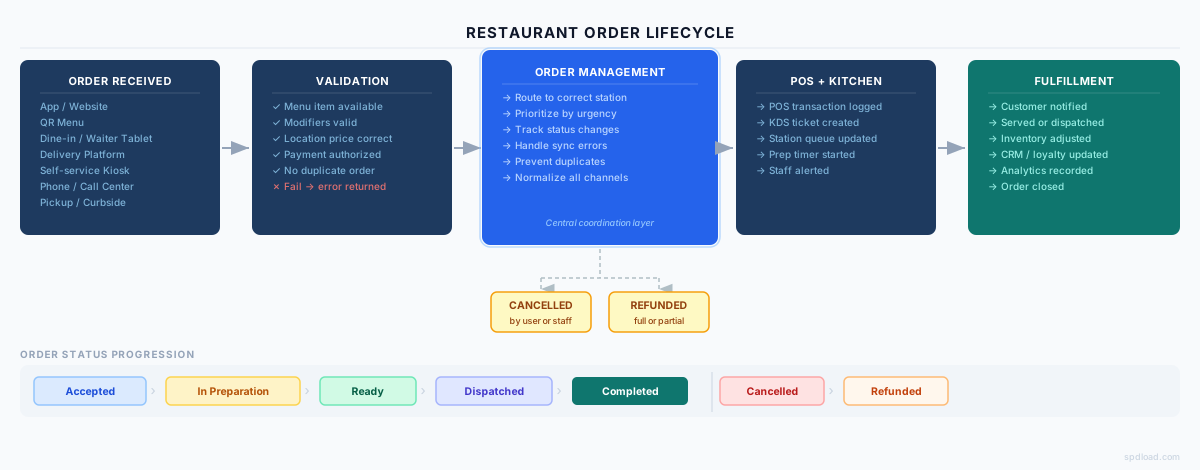
Connect your website, app, QR menu, POS, kitchen workflows, payments, and analytics in one reliable flow.
Omnichannel Intake: Supported Ordering Platforms
Here are the most widespread order channels:
- Dine-in and table ordering is still the foundation for most sit-down restaurants. A server takes the order, or in some setups, the customer orders directly from the table.
- QR menu orders let customers scan a code, browse the menu, and place an order from their own phone. No app download required. This has become common enough that customers expect it as an option, especially for quick-service settings.
- Waiter tablets give staff a faster way to enter orders directly into the system from the floor, cutting out the back-and-forth to a fixed terminal.
- Restaurant app orders and website orders serve customers who want to order ahead, whether for delivery or pickup. These online ordering channels also tend to carry the most customer data, including order history, preferences, and saved payment methods.
- Pickup and curbside pickup orders need accurate timing more than anything else. If the system can’t reliably predict when food will be ready, customers either wait too long or show up too early.
- Self-service kiosks work well for high-traffic, quick-service environments where speeding up the line matters more than personal interaction.
- Third-party delivery platforms bring in volume but also bring complexity because menus, pricing, and order formats often need to be translated between the platform’s system and the restaurant’s own. If you’re building or evaluating a delivery-focused setup, it’s worth looking at how to build a food delivery app, since a lot of the same channel-routing logic applies there too.
- Call center orders still matter for some businesses, particularly chains with phone-based ordering habits that haven’t fully shifted online.
A restaurant rarely relies on one type. It’s usually the mix of methods that depends on the business. A single quick-service restaurant might only need a website, an app, and a couple of delivery platforms. And a full-service restaurant chain might need all of the above, plus the staff-facing tools to manage them all and meet customer expectations. 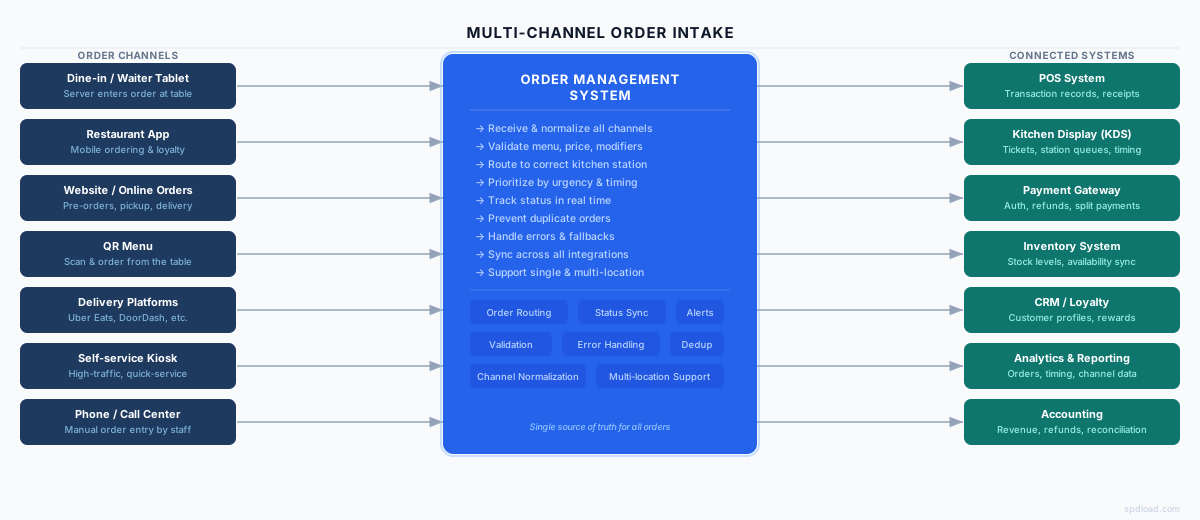
Core Features of a Restaurant Order Management System
These are the features that make up the system day-to-day. Some matter more depending on how a restaurant operates, but together they cover what most setups need.
Menu and Modifier Synchronization
The menu is the foundation on which everything else depends. If it’s out of sync across channels, customers order things that don’t exist anymore, and staff end up fixing problems that shouldn’t have happened in the first place.
| What it tracks | Why it matters |
|---|---|
| Menu items | Keeps every channel showing the same, current menu |
| Availability | Removes items the moment they sell out, across all channels at once |
| Ingredients | Connects menu items to what’s actually needed to make them |
| Modifiers | Keeps add-ons, substitutions, and customizations consistent |
| Location-specific pricing | Reflects different prices across multiple locations |
| Out-of-stock items | Prevents orders for items the kitchen can’t fulfill |
Order Routing
Once an order is validated, it needs to get to the right place, in the right order. Routing logic typically considers:
- Location – which restaurant or kitchen the order belongs to.
- Kitchen station – grill, fryer, bar, dessert, and so on.
- Order type – dine-in, pickup, delivery, each often handled differently.
- Estimated preparation time – so faster items don’t get stuck behind slower ones.
- Priority – rush orders, VIP customers, or time-sensitive pickups.
Real-Time Order Statuses
Customers and staff both need to know where an order stands at any given moment. Most systems track a similar set of statuses:
| Status | What it means |
|---|---|
| Accepted | Order confirmed and validated |
| In preparation | Kitchen has started working on it |
| Ready | Prepared and waiting for pickup, dispatch, or table delivery |
| Dispatched | Out for delivery or handed to the customer |
| Completed | Order fulfilled and closed |
| Cancelled | Order stopped before completion |
| Refunded | Payment reversed, fully or partially |
Kitchen Workflow Support
The order management system doesn’t replace a kitchen display system, but it feeds it the information it needs to work properly. At a basic level, this means:
- Kitchen display screens showing incoming orders.
- Order prioritization so urgent items surface first.
- Preparation timing to keep pace with the queue.
- Station-specific views, so each station only sees what’s relevant to it.
We’ll go deeper into kitchen display systems development in a dedicated article. This is just the part that touches order management directly.
Payments, Refunds, and Split Transactions
Payment handling is one of the areas where small mistakes get noticed fast. Both by customers and by accounting. A solid system handles:
- Payment status tracking, synced across POS and online channels.
- Split bills, where one order is divided across multiple payments.
- Partial refunds, for cases like a missing item rather than a full order issue.
- Payment security, keeping transaction data handled properly.
- Reconciliation, so what was charged matches what was recorded.
This is also where QR-based ordering process tends to introduce extra complexity. Split payments at a single table, for instance, need the system to track who paid for what. We’ve seen this play out directly in a QR menu and payment solution we built for a hospitality client, which we’ll walk through later in this article.
Customer Notifications
Customers don’t need to know everything happening behind the scenes, but they do expect to be kept in the loop at key moments:
- Order confirmation.
- Preparation status updates.
- Pickup readiness.
- Delivery status.
- Cancellation notices.
- Refund status.
If you’re building or refining the app side of this experience, our restaurant app development guide covers the customer-facing piece in more depth.
Analytics and Reporting
None of the above matters much if you can’t see how it’s actually performing. Useful reporting usually centers on:
| Metric | What it reveals |
|---|---|
| Average preparation time | Whether kitchen workflows are keeping pace |
| Cancellation rate | How often orders fail to complete, and possibly why |
| Delayed orders | Where bottlenecks are forming |
| Order accuracy | How often what’s prepared matches what was ordered |
| Peak periods | When demand spikes, for staffing and prep planning |
| Channel performance | Which ordering channels are actually driving revenue |
| Revenue by location | How individual locations compare for multi-location operators |
Key API Integrations for a Seamless Tech Stack
An order management system for restaurants rarely works alone. Its value mostly comes from how well it connects to everything else a restaurant already relies on.
| Integration | Data exchanged | Why it matters |
|---|---|---|
| POS | Order details, payment status, transaction records | Keeps sales and order data aligned across the front of house |
| KDS | Order tickets, prep status, station assignments | Makes sure the kitchen sees orders the moment they’re validated |
| Payment gateway | Payment authorization, refunds, transaction confirmations | Confirms money has actually moved before an order proceeds |
| Inventory | Ingredient usage, stock levels, availability updates | Keeps the menu accurate as stock changes throughout the day |
| CRM and loyalty | Customer profiles, order history, reward points | Connects orders to repeat customers and restaurant loyalty programs |
| Delivery platforms | Incoming orders, menu sync, order status updates | Brings external orders into the same workflow as everything else |
| Analytics | Order, status, and timing data across channels | Feeds the reporting that shows how the business is actually performing |
| Accounting | Revenue, refunds, reconciled transactions | Keeps financial records consistent with what was sold |
Most of these connections run through APIs, where multiple systems exchange data on request, or webhooks, where one system notifies another the moment something changes. In more complex setups, a middleware layer sits between everything, translating data formats and managing the back-and-forth so individual systems don’t need to talk to each other directly.
A few things tend to cause real problems if they’re not handled carefully:
- Synchronization. If two systems disagree about an order’s status, staff end up working from outdated information.
- Duplicate prevention. A delivery platform retrying a failed request shouldn’t create a second order.
- Error handling. When an integration fails, the system needs a clear fallback, not a silent gap in the order flow.
Restaurant POS integration specifically deserves its own deep dive as there’s a lot to get right around data formats, sync timing, and handling POS-specific quirks, which we’ll cover in a dedicated article.
Single-Location vs Multi-Location Order Management
Restaurants often start with order management designed for one location, then run into friction the moment a second location opens.
| Requirement | Single location | Restaurant chain or franchise |
|---|---|---|
| Menu management | One menu, updated directly | Shared base menu with location-specific variations |
| Pricing | One price list | Pricing that can vary by location, region, or market |
| Roles | A small set of staff roles | Layered permissions – location staff, regional managers, head office |
| Reporting | Performance for one site | Performance compared across locations, plus consolidated totals |
| Order routing | Routes within one kitchen | Routes to the correct location based on where the order was placed |
| Location availability | Not usually a factor | Some items or promotions may only run at certain locations |
| Promotions | Applied directly | Centrally managed, but possibly location-specific in execution |
| Centralized dashboard | Optional, mostly for personal tracking | Often essential, for visibility across the whole operation |
The practical difference comes down to this: a single-location system mostly needs to work well. A multi-location restaurant management software needs to work the same way everywhere, while still allowing for the differences that real locations have.
This is also where a lot of off-the-shelf software starts to show its limits. It might handle one restaurant fine, but stretch awkwardly once a second or third location is added, especially around centralized reporting and location-specific pricing.
MVP vs. Advanced Capabilities for Custom Platforms
When a restaurant is building or choosing an order management system, it helps to separate key features genuinely needed to launch from what can wait until the system is proven and the business has grown into needing more.
| MVP features | Advanced features |
|---|---|
| Basic order intake | AI-assisted prioritization |
| Menu synchronization | Demand forecasting |
| POS and KDS connection | Multi-location analytics |
| Basic payment processing | Advanced refund logic |
| Status tracking | Dynamic throttling |
| Customer notifications | Predictive preparation times |
The MVP column covers what makes the system functional: orders come in, the menu is accurate, payments are processed, the kitchen knows what to make, and customers know where their order stands. Without these, nothing else really matters.
The advanced column is where things get more sophisticated, but also more dependent on actually having enough data and volume to justify them. Demand forecasting only works if there’s enough order history to forecast from. Dynamic throttling only matters once order volume is high enough to need it.
Important note here: what counts as MVP depends on the business model. A single quick-service restaurant might consider basic payment processing and status tracking enough to launch. A delivery-heavy operation might need third-party app integration in its MVP from day one, since that’s where most of its orders originate.
Should Restaurant Owners Build, Buy, or Integrate?
Once a restaurant knows what it needs, the next question is how to get there. There are generally four paths, and each one comes with real tradeoffs.
| Approach | Explanation | Best fit when |
|---|---|---|
| Off-the-shelf software | A ready-made order management platform, used mostly as-is | Operations are fairly standard, and speed to launch matters most |
| Several tools connected through integrations | Separate POS, KDS, payment, and delivery tools, linked together | Existing tools already work well individually, and you mainly need them talking to each other |
| Custom order management platform | A system built specifically around how the business actually operates | Workflows are unusual enough that off-the-shelf options keep falling short |
| Custom middleware layer | A custom layer that sits between existing tools, handling sync and logic | The existing tools are fine, but nothing on the market connects them the way the business needs |
None of these is inherently the “right” choice. It depends on a handful of practical factors:
- Number of locations.
- Order volume.
- Operational complexity.
- Unusual workflows.
- Integration requirements.
- Need for data ownership.
- Scalability.
We can design a custom order management system or integration layer around your existing tools.
Development Cost Factors for Restaurant Order Processing System
It’s tempting to want a single number here, but cost depends heavily on multiple factors, including:
- Number of channels supporting dine-in only is simpler than supporting dine-in, app, QR menu, and three delivery platforms at once.
- Number of integrations. Each connection (POS, payment gateway, inventory, CRM) adds development and testing work.
- POS and KDS complexity. Some POS systems have well-documented APIs; others require more workarounds to connect properly.
- Payment logic. Basic payment processing is straightforward; split bills, partial refunds, and multi-method payments add real complexity.
- Multi-location requirements. Centralized dashboards, location-specific pricing, and cross-location reporting all add scope.
- Analytics. Basic status tracking is simple; predictive features and forecasting require more sophisticated data work.
- Mobile applications. Building and maintaining native or cross-platform apps is a separate, substantial piece of work.
- Staff roles. Simple permission structures are easy. Layered roles across head office, regional managers, and individual locations take more design work.
- Offline mode. Making sure the system still functions during an internet outage adds meaningful engineering effort.
- Data migration. Moving existing menu, customer, and order history from old systems takes time and careful handling.
- Security. Payment data and customer information both require proper handling, which isn’t optional regardless of budget.
- QA and rollout. Testing across channels and locations, plus a careful rollout plan, takes real time before launch.
In our experience, the factors that most often get underestimated are integrations and multi-location requirements. They look straightforward at first glance, but the data syncing and edge-case handling tend to take longer than expected.
Case Study: QR Menu and Payment Solution for HoReCa
It’s one thing to describe order management in theory. But it’s an entirely different thing to see how the pieces come together on a real project. We built a QR menu and payment solution for a hospitality business that needed exactly the kind of coordination this article has been describing.
The core idea was simple from the customer’s side: scan a code at the table, browse the menu, and place an order directly from a phone. Underneath that simplicity, the system had to handle several moving parts at once.
- Menu browsing that stayed current, since nothing breaks trust faster than ordering something the kitchen can’t actually make.
- Order placement that fed directly into the restaurant’s existing workflow, rather than creating a separate, disconnected channel.
- Payment processing built directly into the ordering flow, so customers could pay without waiting for a server.
- Split-payment logic for tables splitting a bill across multiple people. One of the trickier parts to get right, since it means tracking partial payments against a single order.
- Integration with existing POS and KDS systems already in place, rather than asking the business to replace tools that were already working.
- Real-time menu updates, so changes to availability or pricing showed up instantly across every active QR session.
- Multi-location support, since the solution needed to work consistently across more than one site, not just a single pilot location.
This is how the system looks like: 
Implementation Checklist
Before building or rolling out a restaurant order management system, it helps to work through a clear checklist rather than figuring things out as problems come up.
- Decide which channels you need (dine-in, app, QR menu, delivery, and so on) before building for all of them.
- Outline every status an order moves through, from placement to completion.
- Agree on which system holds the authoritative record when data conflicts.
- Settle how items, pricing, and customizations work before connecting channels to them.
- Confirm every system that needs to connect and what data each one needs to send or receive.
- Decide what happens when a payment fails, an integration drops, or an order arrives twice.
- Separate MVP and phase-two features.
- Make sure the system holds up under real volume, not just quiet-period testing.
- Train staff, because even the best system fails if staff don’t know how to use it under pressure.
- Monitor performance after rollout.
This list works best as a sequence, but it’s also worth revisiting after launch. Most of the actual problems show up in the first few weeks of real use, not during planning.
Conclusion: The ROI of Custom Order Tracking Solutions
Any management system makes sense when it helps to remove friction. For the restaurant industry, this means fewer manual reconciliations, fewer orders falling through the cracks between channels, and fewer moments where staff are guessing instead of knowing.
It’s valuable because it makes everything else (the POS, the kitchen, the delivery platforms, the reporting) work as one connected system instead of several disconnected ones.
It’s also worth remembering that order management is one piece of a larger picture. How it’s built often depends on the rest of a restaurant’s tech stack in 2026, including the cloud infrastructure, the APIs available, and how much of the system needs to be custom versus off-the-shelf.
If you’re running multiple locations, have uncommon workflows, or you need integrations off-the-shelf platforms just can’t handle, that’s when I’d recommend looking into custom restaurant software development services. Sometimes that means building a fully custom platform. Other times, it just means a targeted integration layer that connects the tools you already use. Contact us for a brief conversation to see which direction will work best for you.