How to Add AI Features to a SaaS Product: Use Cases and Rollout Plan
- Created: Jul 17, 2026
- 16 min

Solution Architect, Front-end
Every SaaS team eventually comes to the point when they need to decide whether they should add AI to their product.
Adding AI just for the sake of it is a wrong strategy. AI layer is essentially a way to solve a problem your users already have, only faster, more accurately, or with less manual effort than before.
That distinction is important. A lot of AI additions to SaaS products fail because nobody defined what problem the AI was supposed to solve in the first place. A chatbot gets bolted onto the dashboard, a “smart” label gets added to a button, and a few months later, usage numbers show that almost nobody touched it.
This article explores AI features that tend to create real value in SaaS products, how to pick the right technical approach for each one, how to prioritize when you can’t build everything at once, and how to roll out a feature without betting the whole roadmap on it.
High-Value AI Features for SaaS
Before going deep into each feature, it helps to see them side by side. This table is a quick reference for what each AI feature actually does, what it takes to build, and how you’d know if it’s working.
| AI Feature | User Problem Solved | Suitable Architecture | Key Metric |
| Semantic search | Users cannot find information quickly | Embeddings and search or RAG | search success rate |
| AI copilot | Users need help completing complex tasks | LLM plus product context | task completion |
| Summarization | Users process long documents or activity logs | LLM API | time saved |
| Classification | Teams manually sort requests or records | NLP model or LLM | accuracy and handling time |
| Recommendations | Users need relevant next steps or content | predictive model | engagement or conversion |
| AI customer support automation | Support team handles repetitive questions | RAG assistant | deflection and escalation rate |
| Workflow agent | Users need actions performed across tools | AI agent with integrations | completed tasks and error rate |
We'll validate user demand, operating costs, and technical complexity before adding AI to your roadmap.
Start With the User Problem
I know it’s tempting for SaaS providers to look at what competitors are shipping, or what’s trending in AI, and try to match it to existing workflows. But, in the end, you’ll end up with features that look impressive in a demo and get ignored a month later.
A better starting point is to look at the friction that already exists in your product. A few places worth checking:
- Support tickets. What questions come up again and again? If the same three issues make up half your ticket volume, that’s a strong signal.
- Drop-off points. Where do users abandon a workflow partway through? That’s often a sign the task is more complex or confusing than it should be.
- Manual work logs. Are your users (or your own team) doing repetitive tasks like sorting, tagging, or data entry by hand? That’s a strong candidate for intelligent automation.
- Search behavior and customer experiences. If users search your product frequently and often don’t find what they’re looking for, that’s a gap worth closing.
- Time-consuming tasks. Anything that takes a long time but follows a predictable pattern is worth a second look.
Once you’ve found a real friction point, the next question is simple: would AI help here, or would it just add complexity to your SaaS solution?
I can’t stress that enough: not every problem needs an AI-powered fix. Sometimes better UX or a clearer user workflow solves it just as well, at a fraction of the cost and risk.
AI Features That Create Value in SaaS Products
At SpdLoad, we have been providing AI development services for SaaS companies that want to integrate AI into their processes and/or product. Here are AI features that the SaaS industry can benefit from:
Semantic Search
Traditional search matches keywords, while semantic search matches meaning.
So, if a user types how do I get my money back instead of refund policy, a keyword-based search might come up empty, while semantic AI search feature understands the intent and surfaces the right answer anyway.
This approach makes the most sence in SaaS products with a lot of content to search through: documentation, knowledge bases, internal records, or large libraries of user-generated content.
The user problem is straightforward – people know what they want but don’t know the exact words your product uses to describe it. Semantic search closes that gap.
Under the hood, this usually means converting your content into embeddings (numerical representations of meaning) and searching against those, sometimes paired with a retrieval-augmented generation (RAG) setup if you want the system to summarize or explain results rather than just list them.
AI Copilots
AI copilots for SaaS helps a user get something done inside the product, like filling out a form, building a report, writing a query, configuring a setting.
The value here comes from reducing the number of steps or the amount of expertise a task requires. If your product has a feature that’s powerful but has a steep learning curve, a copilot that understands both the request and the product’s context can turn a 20-minute task into a 2-minute one.
This tends to require an LLM combined with real context about the user’s account, data, and current screen, not just a general-purpose model bolted on top.
Summarization
Many SaaS products generate more information than users can reasonably read: long documents, meeting notes, activity logs, customer histories. Leveraging AI for summarization takes that volume and turns it into something a person can scan in seconds.
It tool solves the time problem. A support agent who needs the gist of a 40-message customer thread, or a manager who needs the highlights of a week’s activity, benefits directly.
On a technical side, a summarization tool is one of the easier features to build, since it can run through an LLM API without much custom infrastructure.
Recommendations
AI recommendation engines suggest what a user should look at, do, or buy next, based on their behavior and the behavior of similar users. In an AI in SaaS context, this might mean recommending a next feature to try, relevant content, or a next best action in a workflow.
Such AI tools solve a decision fatigue problem when a user doesn’t know what to do next, or doesn’t know that something relevant exists.
Recommendation engines typically rely on predictive models trained on user behavior data rather than a general-purpose LLM.
This kind of logic doesn’t have to involve AI from day one, either. In a platform for selecting marketing tools we built, a comparison and overlap engine helped users find the best combination of tools for their stack, the same underlying problem a recommendation model solves, just built with a rules-based approach first. It’s a good example of validating the value of a “suggest the best next option” feature before deciding whether it needs a full predictive model behind it.
Classification
Plenty of SaaS teams manually sort incoming information: tickets by category, leads by quality, documents by type. Classification models automate that sorting, either through a trained NLP model or an LLM prompted to categorize content.
The value is speed and consistency. A model can sort thousands of items the same way every time, without the fatigue or inconsistency that creeps into manual sorting over a long day.
Predictive Analytics
This is less visible to end users but often just as valuable.
Predictive analytics uses historical data to forecast something useful, like which customers are likely to churn, which leads are likely to convert, which accounts might need attention soon.
Predictive analytics tools promote reactive decision-making. For example, instead of finding out a customer churned after the fact, a predictive model can flag the risk while there’s still time to act on it.
Support Assistants
A support assistant is a more specialized version of a copilot, built specifically to handle repetitive customer questions using your own documentation and data. It deflects simple, repetitive questions away from your support team, so they can spend time on the issues that actually need a human.
This is a strong candidate for a RAG setup, where the assistant pulls answers from your existing documentation rather than generating them from general knowledge, which keeps answers accurate and specific to your product.
Workflow Agents
The most advanced category of SaaS AI tools is the AI agent. It’s a system that doesn’t just answer questions or make suggestions, but takes actions across tools on a user’s behalf.
Think of an agent that pulls data from one system, updates a record in another, and notifies a team, all from a single request.
SaaS workflow automation agents solve a different kind of problem, the I don’t want to do this manually across five different screens one.
It’s also the category with the most technical complexity and the highest failure impact if something goes wrong. Why? Because the agent is actually doing something, not just suggesting it.
Choose the Right Technical Approach
Once you know which problem you’re solving, the next decision is how to build it. This is where a lot of SaaS teams either overbuild (spending months training a custom model for something an API could handle) or underbuild (using a general-purpose API for a job that needed real product context). Here’s how the main approaches compare.
External API
Using a provider’s API (like an LLM API) is the fastest way to add AI capability without owning any of the underlying model infrastructure. It works well for tasks like summarization, drafting, or general classification, where you don’t need deep customization or access to proprietary data patterns.
The tradeoff is less control. You’re relying on someone else’s model, pricing, and update schedule. For many SaaS features, especially in an early version, this tradeoff is worth it.
RAG (Retrieval-Augmented Generation)
RAG combines a language model with your own data (documentation, knowledge base articles, past support tickets) so answers are grounded in your actual content rather than the model’s general training. This is the right choice whenever accuracy and specificity matter more than general conversation, which is exactly the case for support assistants and semantic search.
The added complexity is in maintaining the retrieval system: keeping your content indexed, up to date, and structured in a way the model can search effectively.
Custom NLP
For tasks like classification or entity extraction, a custom-trained natural language processing model can sometimes outperform a general LLM, especially at scale, where cost and speed matter more than flexibility. This route takes more upfront investment (data, training, evaluation) but can pay off if the task is narrow and repeats often.
Predictive Model
Recommendations and predictive analytics usually rely on a different kind of model entirely, one trained on structured, historical user and prod data rather than text. This is a more traditional machine learning approach, and it depends heavily on having enough clean historical data to train on.
Limited AI Agent
For workflow automation, a limited agent, one scoped to a small, well-defined set of actions , is almost always safer than an open-ended one. Rather than giving the agent broad access to “do anything,” you define exactly which tools it can use and which actions it can take, then expand that scope only as trust and evidence build up.
Custom Model
Training a model entirely from scratch is rarely the right first step for a SaaS feature. It’s expensive, slow, and usually unnecessary, since most SaaS use cases are well served by an existing model paired with your own data or context. This path tends to make sense only once a feature has proven its value and the volume or specificity of the task justifies the investment.
If you’re weighing where to bring in outside expertise for any of these approaches, it’s often worth looking into artificial intelligence development services, custom API development and integration, natural language processing services, or AI agent development services, depending on which approach fits your feature.
For a broader look at how to weigh custom-built AI against ready-made tools, this article on how to choose between custom and ready-made AI goes deeper into that decision.
How to Prioritize AI Features
I bet your SaaS team can think of a dozen ways to use AI in your product. The ideas stage is (almost) never the problem. The hardest part is to decide which of the numerous ideas to implement first: AI assistant? Maybe RAG? Or a sales automation tool?
In such cases, we use this simple scoring framework that we also use in our SaaS development services.
It helps us take the guesswork out of that decision. We meet up with clients team and score each potential feature against these factors:
| Factor | Explanation | Example |
|---|---|---|
| User demand | Whether users are actually asking for this, not just the team assuming it’d be nice to have | Support tickets show 200+ requests a month for a way to search past conversations |
| Measurable value | Whether success can be defined in advance with a clear metric | The team agrees upfront that success means a 20% drop in search-related support tickets |
| Data readiness | Whether the data the feature needs already exists in usable form | A support assistant needs documentation that’s actually up to date, not scattered across old docs |
| Cost per user | The ongoing cost of running the feature as usage scales | A feature costs $0.01 per use in testing, but that becomes real money at 50,000 monthly users |
| Technical complexity | How much time and effort the feature takes to build and maintain | Summarization ships in a couple of weeks; a workflow agent with multiple integrations takes months |
| Failure impact | What happens, and how bad it is, when the AI-powered tool gets something wrong | A bad recommendation is a shrug; an agent updating the wrong customer record is a real problem |
| Differentiation | Whether the feature gives a real edge or just matches what competitors already offer | Every competitor already has a chatbot, but none offer search across a user’s own historical data |
| Scalability | Whether the feature still works, and still makes sense cost-wise, as the user base grows | A recommendation model trained on 100 users breaks down once there are 10,000 to serve |
We score each candidate feature on these eight factors, even informally, and a clearer picture usually emerges. The feature that scores well across demand, measurable value, and manageable cost and complexity is usually the one we build first.
Build an AI Feature MVP
Once you’ve picked the feature worth building, the instinct is often to build the full version right away. Some companies outsource SaaS development with that goal. That’s usually a mistake.
AI features behave differently from typical software features. How so? Well, their real-world performance is hard to predict until actual users start interacting with them. Even after thorough testing, there might be some unpredicted issues once the feature is live.
So, what we do is we build a limited version first and test it with a small, defined group of users before rolling it out to everyone.
Here’s our workflow:
- Pick a narrow segment. Choose a subset of users, a single customer segment, or a single workflow.
- Set a clear success bar in advance, using the key metric identified earlier (search success rate, task completion, time saved, and so on). This keeps the evaluation objective rather than based on gut feeling.
- Build in a way to catch mistakes. Include a simple way for users to flag when the AI got something wrong, or fell back to a human option.
- Keep the scope small. A narrower, well-executed feature builds more trust than a broad, unreliable one.
- Watch cost alongside performance. Track the cost per user from day one of the beta. This number often changes the prioritization conversation once it’s based on real usage instead of estimates.
At the MVP stage, we find out whether the feature is worth expanding and what needs to change before it does. In a no-code website builder case study, we applied this exact principle: start with a small, well-defined set of capabilities, test them with real users, and expand based on what actually gets used rather than what seems impressive on paper.
If you want a deeper walkthrough of this process, build an AI MVP guide covers the validation approach of artificial intelligence capabilities in more detail.
Metrics to Track After AI Integration
After launch, the real evaluation starts. The right metrics depend on the feature, but most SaaS teams should be watching some combination of the following for actionable insights.
| Metric | What it means | Example |
|---|---|---|
| Activation | Share of eligible users who try the feature at least once | 1,200 of 10,000 eligible users try the new AI search in the first month |
| Adoption | Share of those users who come back and use it again | 700 of those 1,200 use it more than once |
| Repeat usage | How often do active users return to the feature over time | An average user runs 4 AI searches per week |
| Task completion | Whether the feature actually helps users finish what they started | 82% of copilot sessions end with the task completed |
| Time saved | The reduction in time needed to complete a task | Summarizing a 50-message thread takes 10 seconds instead of 5 minutes |
| Support deflection | Share of questions resolved without a human agent | 35% of incoming questions are resolved by the assistant alone |
| Accuracy | How often the model gets it right, checked against real cases | The classification model tags 91% of tickets correctly |
| Escalation rate | Share of interactions where the user asks for a human instead | 12% of assistant conversations end in a request for a human |
| Latency | How fast the feature responds | The copilot replies in under 2 seconds on average |
| Token cost | The ongoing cost of running the feature, per use or per user | Summarization costs $0.004 per use, about $0.40 per user monthly |
| Retention | Whether using the feature affects how long users stick around | Copilot users are 15% more likely to still be active in month four |
| Churn | Whether the feature affects the rate users cancel or leave | Users of the support assistant churn less than non-users |
Common Mistakes of SAAS AI Integration
Here’s why these mistakes happen during AI SaaS development and what they tend to cost.
A generic chatbot without a clear job
This is usually a symptom of building the feature backwards: starting with “we should have AI” and working back to a use case, instead of starting with a problem. A chat window that can technically answer “anything” puts the burden on the user to figure out what it’s good for, and most won’t bother. The fix is a narrower one, built around one or two things it does reliably well.
Unclear value
If a team can’t explain the feature’s benefit in one sentence, users won’t be able to either. This mistake often hides behind impressive-sounding descriptions (“AI-powered insights,” “smart recommendations”) that say nothing about what actually changes for the user. The test is simple: replace “AI” with what it actually does. If the sentence still makes sense and sounds useful, the value is real. If it falls apart, the feature probably needs more definition before it needs more development.
Expensive API usage
This mistake is dangerous precisely because it’s invisible at first. A feature that costs a few dollars a day in a beta rollout with 50 users can quietly become a five-figure monthly bill at scale, and by the time finance flags it, the feature is already live and users depend on it. The teams that avoid this aren’t the ones with the cheapest models. They’re the ones who modeled cost per user against realistic growth before launch, not after the invoice arrived.
Poor onboarding
AI SaaS features tend to introduce new behavior, not just new buttons, and new behavior needs explaining. A powerful copilot that nobody understands how to use performs identically, from a business metrics standpoint, to a copilot that doesn’t work at all. The gap between “built well” and “used well” is almost always onboarding, and it’s one of the cheapest problems to fix relative to how much adoption it can unlock.
Lack of evaluation
Software either works or throws an error. AI features occupy a much murkier middle ground: they can be wrong confidently, plausibly, and silently. Without an ongoing way to check accuracy, a support assistant can be giving subtly wrong answers for weeks before anyone notices, usually only after a customer complains or escalates. Evaluation isn’t a launch-day task. It’s a permanent line item, the same way monitoring uptime is.
No fallback
This mistake usually comes from over-trusting early test results. A feature that performs well on a curated set of test cases will still meet edge cases in production that nobody anticipated. When it does, and there’s no visible path to a human or a manual option, the user isn’t just stuck, they lose trust in the feature entirely, even if it works correctly 95% of the time. A fallback isn’t an admission that the AI is unreliable. It’s what makes users comfortable trusting it in the first place.
Over-automation
There’s a meaningful difference between AI that suggests an action and AI that takes it. Teams sometimes skip straight to the second without asking whether users actually want to hand over that control, especially for anything irreversible, like sending an email, deleting a record, or charging a customer. The safer default is usually AI-as-suggestion with a human approving the final step, and only automating fully once trust has been earned through a track record, not assumed from the start.
Ignoring privacy
AI features often touch the most sensitive data a product holds, customer records, internal documents, usage history, and every one of those now potentially passes through a third-party API. This mistake tends to stay invisible until it isn’t: a customer’s security team asks where their data goes during a vendor review, and the answer isn’t ready. Mapping out data flow, retention, and third-party exposure before launch is far cheaper than answering for it after a customer notices.
Nearly all of these trace back to the same root cause: treating the AI feature development like a normal software feature one, when it behaves, fails, and needs monitoring differently.
From One AI Feature to an AI Product Roadmap
Once a single AI feature has proven its value, a natural question is What’s next?
This is where a one-off feature can grow into a real part of the product roadmap, but it’s worth doing that expansion deliberately rather than all at once.
We usually start by looking at what the first feature’s raw data showed:
- Which parts performed well?
- Where did users hit friction?
- What did the cost per user look like once real usage kicked in?
These answers matter more than any assumption made before launch, and they should shape what gets built next.
From there, expansion usually looks like building on validated ground rather than starting a new experiment from scratch. If a support assistant successfully deflected common questions, the next step might be expanding its knowledge base rather than jumping straight to a fully autonomous agent. If a copilot handled three tasks well, adding a fourth is a smaller, safer step than redesigning it to handle everything at once.
It also helps to keep the same evaluation habits from the first feature: clear metrics, a defined success bar, and a way to catch failures early.
Over time, this approach turns AI from a single feature into a genuine capability of the product and a competitive edge, one that’s grounded in evidence rather than trend-following. 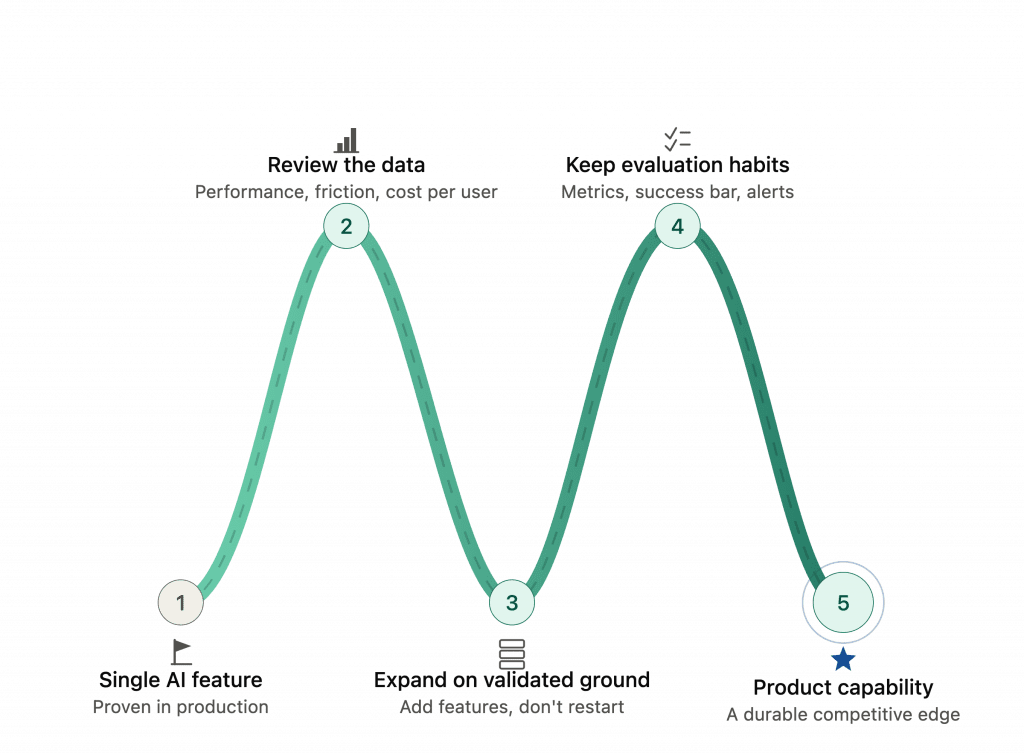
AI Technologies in SaaS: Implement or Skip?
For me, the answer is almost alway implement. But the decision whether to add AI to SaaS product is always yours and your teams.
After all, adding AI functions to a SaaS product doesn’t need to start with a big, all-encompassing plan. It starts with one real problem your users have, and one focused feature built to solve it.
Get that right, measure it honestly, and let the results guide what comes next. That’s a far more reliable path than trying to add AI everywhere at once, and it’s the one that tends to actually show up in retention numbers, not just in a product demo.
If you’re weighing where AI fits into a broader product strategy, this article on AI in product development is a useful next read, along with a look at typical SaaS development cost if you’re scoping out what a feature like this might take to build.
Start with a focused feature that creates measurable value for your users and team.